Wispr Flow Pricing 2026: Plans, Real Cost & Alternatives
Wispr Flow costs $15/month or $144/year with no lifetime plan. See every tier, the real 5-year cost, and one-time alternatives for Mac.
Updated August 21, 202614 min
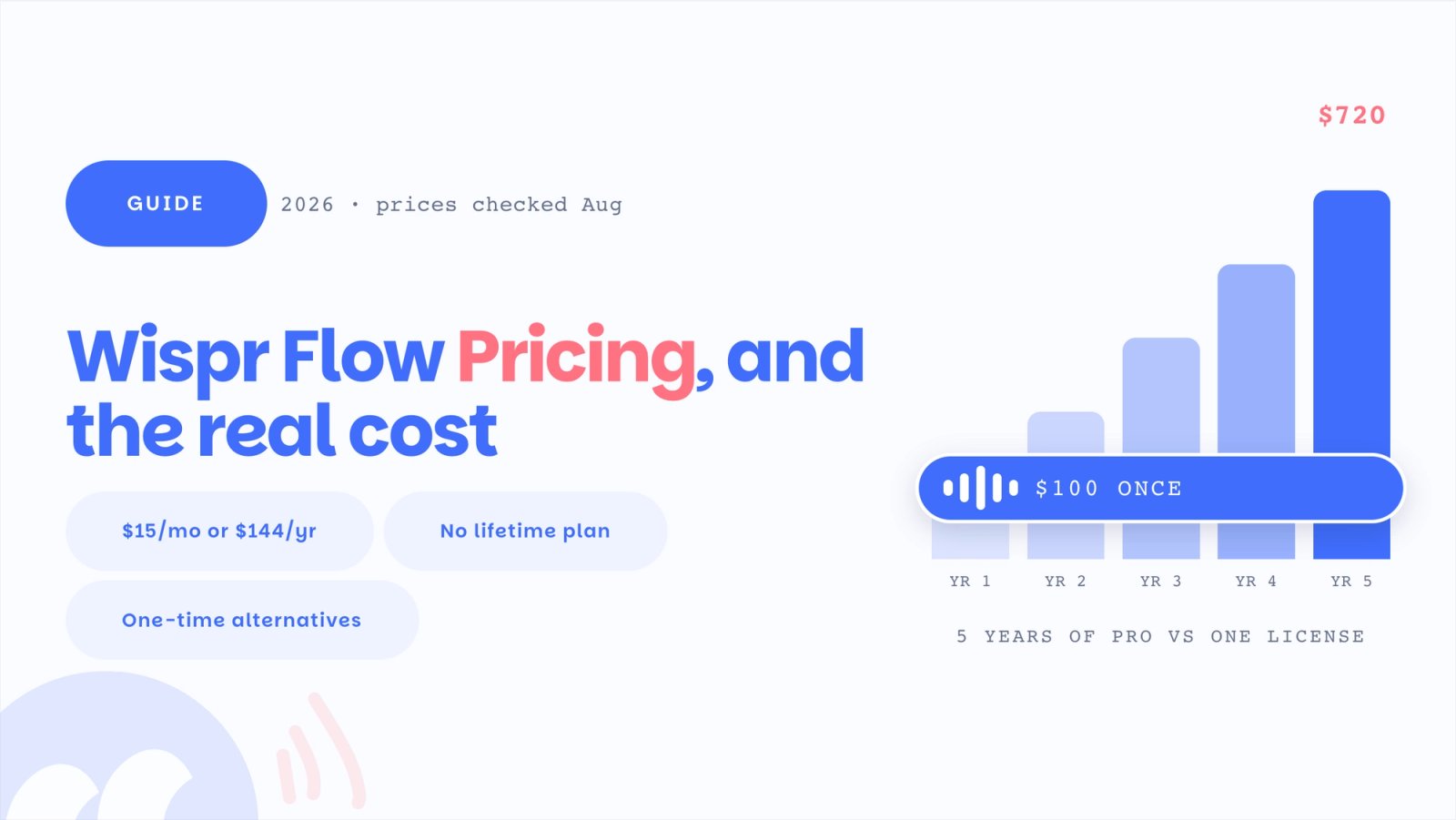
Wispr Flow costs nothing on the Basic plan, $15 per user per month on Pro, or $12 per user per month when you pay annually, which works out to $144 a year. Pro also covers teams with no minimum seat count, Enterprise is quoted separately, and there is no lifetime or one-time option.
It is a cloud tool, so every word you dictate is processed on Wispr's servers. For Mac users the real decision is not the monthly number. It is whether a recurring cloud subscription fits how you work, or whether a one-time on-device app costs less over a few years and keeps your audio off the internet.
This guide breaks down every Wispr Flow plan, what the free tier actually covers, the long-run cost compared to one-time alternatives, the reliability and privacy questions worth knowing before you pay, and which tool fits five common situations. Prices for every product here were checked against the official pricing pages in July 2026.
How much does Wispr Flow cost?
Wispr Flow has three public tiers plus a custom Enterprise plan. There are no per-word charges beyond the free tier's weekly cap, and the annual option is a flat 20 percent off the monthly rate.
| Plan | Monthly | Annual (per user) | What it is for |
|---|---|---|---|
| Flow Basic | Free | Free | Trying dictation, light daily use |
| Flow Pro | $15/user | $12/user ($144/year) | Daily individual and small-team use |
| Flow Enterprise | Contact sales | Contact sales | Teams needing security and compliance controls |
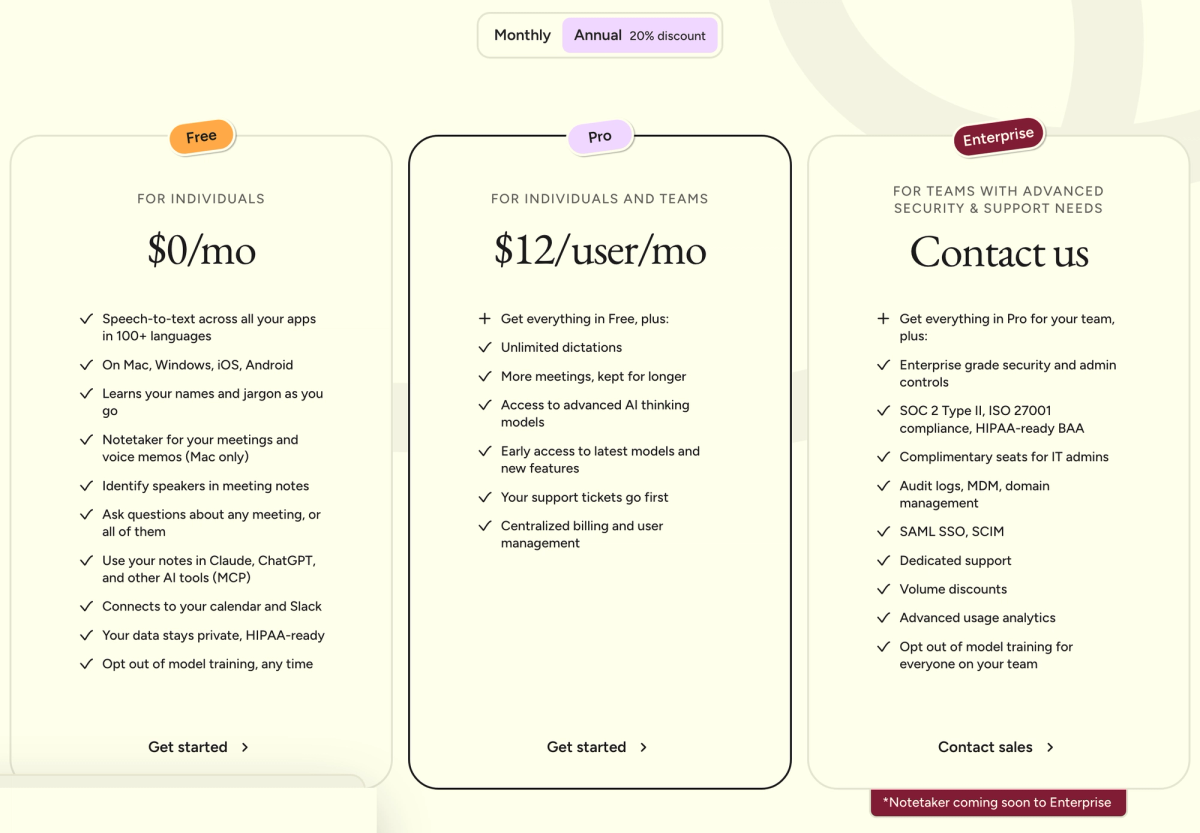
Every plan is billed per user, including the individual Pro plan. Pro on a monthly subscription is $15; committing to a year drops the effective rate to $12 a month. The 20 percent annual discount is the only built-in price break apart from the student offer, which we cover below.
Flow Basic: what the free tier actually gives you
Flow Basic is genuinely free and stays free, with no trial clock. It includes 2,000 words per week on Mac or Windows (with a 5,000 word hard cap, resetting Sundays), 1,000 words per week on Flow for iPhone, and unlimited words on Android for what Wispr calls a limited promotional period. You also get a custom dictionary and snippets, support for 100-plus languages, Privacy Mode, and HIPAA-ready handling.
The 2,000 word weekly cap on desktop is where most people run into a wall. At a normal speaking pace, 2,000 words is roughly 15 to 20 minutes of dictation across an entire week. A single long email reply can be 300 words, and a few drafted notes can finish the budget before midweek.
Basic works well as an extended trial or for someone who dictates a handful of messages a day. It is not built to be a daily writing tool, and it does not pretend to be.
The honest read on Basic: it is a real free tier, not bait, and it is the right way to test whether Wispr hears your accent and fits your apps before you pay for anything.
Flow Pro: what $12 to $15 a month includes
Flow Pro removes the word cap and adds the features most daily users actually want. On top of everything in Basic, Pro includes unlimited words across Mac, Windows, iPhone, and Android, Command Mode for editing, prioritized support and feature requests, early access to new features, and team collaboration tools.
Command Mode is the feature worth understanding, because it is more than a higher word limit. It lets you highlight text and change it by voice, with instructions like "make this shorter" or "change to a formal tone." That kind of contextual edit runs in the cloud, which is part of why Wispr is a cloud product rather than an on-device one. It is a real capability, and it is the main reason to move from Basic to Pro if you write a lot.
What Pro does not include is the compliance layer. SOC 2 Type II, ISO 27001, enforced HIPAA, enforced Privacy Mode, and SSO are all Enterprise-only. If your employer's security review needs any of those, Pro will not clear it.
Teams and Enterprise: when you actually need them
Flow Enterprise is a sales conversation with no public price. It adds dedicated support, SOC 2 Type II and ISO 27001 compliance, enforced HIPAA compliance, enforced Privacy Mode with zero data retention, SSO and SAML, advanced usage dashboards, bulk pricing discounts, and dedicated IT admin seats at no extra cost.
The distinction that matters for regulated teams is "ready" versus "enforced." Basic and Pro are HIPAA-ready, meaning the controls exist and you can configure them. Enterprise enforces them, so no individual user can bypass the setup. For a healthcare or legal compliance review, enforced is usually the version that clears the bar. If you only need it available rather than mandated, you may not need Enterprise pricing at all.
Annual versus monthly, and is there a Wispr Flow discount code?
The annual discount is straightforward. Pro drops from $15 a month to an effective $12 a month when billed yearly, which saves $36 per user per year, or 20 percent. There is no separate code to enter. You simply pick the annual plan at checkout.
There is no public Wispr Flow promo or coupon code in 2026. The two real savings are annual billing and the student offer on Wispr's own student page: verified students get 3 months free, then roughly 50 percent off Pro at about $6 a month billed annually. It is a verification flow, not a code.
If you searched for a "Wispr Flow discount code," the honest answer is that one does not exist. The closest thing is annual billing, and you are still paying $144 every year with no one-time off-ramp.
Has Wispr Flow's price changed?
The sticker has been stable. Wispr Flow shipped on Mac in October 2024, added Windows in March 2025 and iPhone in June 2025, and pricing coverage across 2025 and 2026 quotes the same $15 monthly and $12 annual rate the official page shows in August 2026. If you are waiting for a price drop, there is no precedent for one.
One thing did change in 2026: the separate Teams tier is gone. Wispr's Teams tier was listed at $12 per user monthly, or $10 per user annually with a three seat minimum, and several pricing guides still quote it. As of August 2026 Wispr's own pricing and business pages show only Free, Pro, and Enterprise, with teams buying Pro at the individual rate and getting centralized billing.
There is also no sign of a lifetime plan arriving. Wispr has raised more than $80 million in venture funding, including a $30 million round led by Menlo Ventures in June 2025 and a $25 million extension at a reported $700 million valuation later that year. A company priced on recurring revenue has little reason to sell a one-time license, which is why the lifetime options in this market come from smaller independent developers.
Refunds and trials: how you exit matters
One pricing detail rarely compared side by side is what happens if you change your mind. Wispr Flow's Terms of Service state that refunds are only issued where required by law; there is no standard money-back guarantee. Canceling a subscription stops the next billing cycle rather than returning money already paid, so the 14-day Pro trial is the real evaluation window, and it is worth using deliberately.
The one-time tools in this guide take the opposite approach, because a single larger payment needs a safety valve. Superwhisper includes a 30 day refund window on all paid plans, and Mumble Dictation carries a 30 day money back guarantee. In practice that means a one-time purchase here is lower risk than it looks: you get a month to decide, against a subscription where the decision point is compressed into two trial weeks.
The real cost over time: one-time versus subscription
Price per month is easy to compare. Total cost over a few years is where the real difference shows up, because Wispr Flow has no lifetime option and the bill repeats every year. Here is how the dictation tools in this guide compare over one, three, and five years, using each tool's lowest committed rate.
| Tool | Pricing model | Year 1 | 3 years | 5 years |
|---|---|---|---|---|
| Mumble Dictation | $100 one-time, 3 Macs (currently $50 limited offer; free tier available) | $100 | $100 | $100 |
| Aqua Voice Pro | $96/year | $96 | $288 | $480 |
| Wispr Flow Pro | $144/year | $144 | $432 | $720 |
| Superwhisper Pro | $249.99 one-time | $250 | $250 | $250 |
| Apple Dictation | Free | $0 | $0 | $0 |
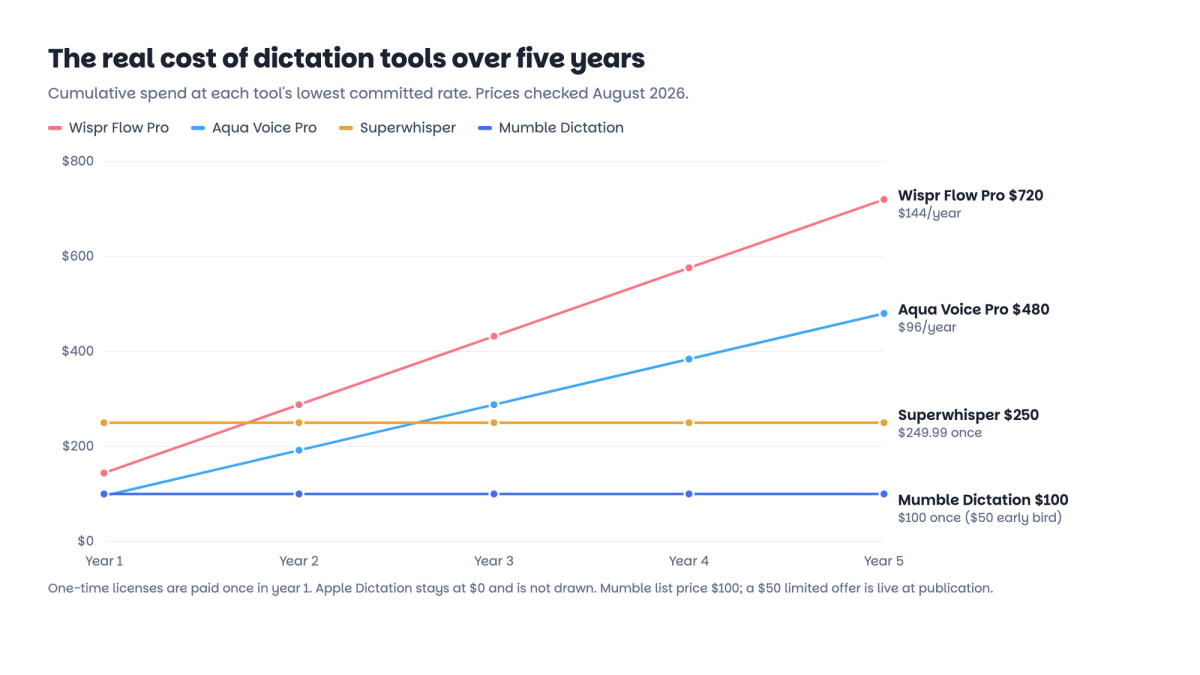
A one-time license changes the math the longer you use the tool. Wispr Flow Pro at $144 a year reaches $432 over three years and $720 over five.
A one-time purchase caps your total spend on the day you buy it. The break-even against Wispr Flow Pro annual arrives inside the first year for any of the one-time tools here.
Two honest caveats sit under this table. First, Apple Dictation, Superwhisper's free tier, and Mumble's free tier cost nothing, so "cheapest" is always $0 if you are willing to accept a limited tool.
Mumble's free tier is the outlier in that group: it has no word cap, though it covers plain transcription without the AI cleanup layer. Among full-featured paid options, a one-time license carries the lowest long-run cost.
Second, Superwhisper's lifetime is $249.99, more than twice Mumble's $100 list price, but Superwhisper also offers a free tier and an $84.99 annual plan, so it is not simply the expensive option. The cleaner comparison is one-time versus recurring: paying once versus paying every year.
Cloud versus on-device: what Privacy Mode does and does not do
This is the part buyers most often misread, so it is worth being precise. Wispr Flow's Privacy Mode is a data-retention setting. It is not an offline mode.
Your audio still travels to Wispr's servers to be processed. Privacy Mode changes whether that data is kept after processing, not where the processing happens.
| Question | Wispr Flow Privacy Mode | On-device dictation (local models) |
|---|---|---|
| Where is audio processed? | Wispr's cloud servers | On your own Mac |
| Does audio leave your device? | Yes | No |
| What does the setting change? | Retention after processing | The processing location itself |
This distinction matters for legal notes, healthcare notes, interviews, and any internal policy that says recordings should not leave the device. Zero retention reduces how long data is stored, but it does not remove the round trip to the cloud. If your requirement is that audio never leaves your Mac, you need a tool that processes on-device, which Wispr Flow does not.
Tools like Superwhisper's local models and Mumble run transcription on the machine itself. You can read more about how on-device processing differs from cloud dictation, since the gap is the whole point for privacy-sensitive work.
Wispr Flow versus the alternatives
If you are comparing Wispr Flow to the rest of the Mac dictation field, the useful axis is not which tool is cheapest. It is how each one is built and billed. The table below compares the main options I looked at. (You can also read a fuller list of Wispr Flow alternatives and a broader roundup of the best dictation software for Mac.)
| Wispr Flow | Aqua Voice | Superwhisper | Apple Dictation | Mumble Dictation | |
|---|---|---|---|---|---|
| Processing | Cloud | Cloud | Local or cloud | Mostly on-device | Local |
| Pricing | $144/year | $96/year | $249.99 once (also free / $84.99 yr) | Free | Free tier + $100 once, 3 Macs ($50 limited offer) |
| Audio leaves your device | Yes | Yes | No on local, yes on cloud | No on supported languages | No |
| Voice editing of text | Yes (Command Mode) | Yes (Custom Instructions) | Yes (custom prompts) | No | Yes |
| Control beyond the text box (open a site, run a search) | No | No | No | No | Yes |
| Platforms | Mac, Windows, iOS, Android | Mac, Windows, iOS | Mac, Windows, iOS | Mac, iOS | Mac |
| Custom dictionary | Yes | Yes | Yes | No | Yes |
A few things stand out. Wispr Flow and Aqua Voice are cloud subscriptions, with Aqua a little cheaper at $96 a year and tuned toward technical and developer vocabulary through its Avalon model.
Superwhisper is the flexible middle, running either local or cloud models, with a free tier, a cheap annual plan, and a $249.99 lifetime. Apple Dictation is the free baseline built into every Mac.
The one row where the tools genuinely diverge is control beyond the text box. Every paid tool here can reshape the text you dictate. Wispr's Command Mode, Aqua's Custom Instructions, and Superwhisper's custom prompts all edit or reformat what you said. None of them act on the system itself.
Mumble Dictation, a one-time-purchase dictation app for Mac, uses AI Actions to do more than type: press a number key while holding fn to open a website, run a search, format the last thing you said, or drop in an emoji without leaving the keyboard.
If your interest in voice is mostly faster typing, that row will not matter to you. If you want voice to drive the machine and not just fill a text field, it is the difference.
A fair note on Mumble: it is Mac only, and it is a newer and smaller tool than Wispr Flow or Superwhisper, so it has a shorter track record. Its free tier covers unlimited on-device dictation with no word caps in 40 plus languages. The paid layer is a one-time $100 license that covers three Macs, currently $50 during a limited offer, and adds on-device AI cleanup, AI Actions and custom prompts, a dictionary that learns your words, and voice actions, with a 30 day money back guarantee rather than a yearly bill.
Who should pick which
The best plan depends on your weekly volume, your platforms, and your privacy needs more than on the sticker price. Five common situations:
You dictate occasionally, under 2,000 words a week. Start with a free option. Apple Dictation is built in, Wispr Flow Basic gives you cloud cleanup within the weekly cap, and Mumble's free tier gives you on-device dictation with no word cap at all. At light volume any of the three works; pay for something only when a specific limit becomes a regular annoyance.
You need the same tool on Mac, Windows, iPhone, and Android. Wispr Flow is the pick. It is the only product in this guide that covers all four with one account. Mumble is Mac only, and Superwhisper and Aqua both skip Android. For genuine multi-device work, $144 a year is a fair cross-platform premium.
You dictate daily on a Mac and want privacy without a monthly bill. A local, one-time tool fits better than a cloud subscription. Mumble Dictation processes on-device, captures no audio to the cloud, and is a one-time license covering three Macs, with a free unlimited tier if you only need plain transcription. The honest caveat is that Superwhisper also runs on-device with local models, so if all you want is clean transcription, it is a strong and more established option. Mumble's edge is AI Actions and the one-time price.
You work with sensitive material as a lawyer, doctor, or in a security-conscious role. Architectural privacy matters more than certifications on cloud data, so an on-device tool is the right default. A product that never sends audio off the device gives a different risk profile than a cloud tool with zero-retention settings. Wispr's enforced Privacy Mode and HIPAA controls on Enterprise are meaningful for regulated cloud workflows, but a cloud product cannot match a tool that never transmits.
Your team needs SOC 2, HIPAA, or SSO. Wispr Flow Enterprise is built for this, with SSO and SAML, enforced HIPAA, ISO 27001, and admin dashboards. Mumble has no enterprise compliance program, so it is not the answer here. Individual team members who want local-only dictation on their own machines can pair an on-device app with whatever the org standardizes on.
Frequently asked questions
Is Wispr Flow worth the money?
For people who dictate daily on Mac and iOS and want cloud AI cleanup plus voice editing, Pro at $12 a month is a fair price. Mac-only users who skip cloud rewriting can pay once for an on-device tool instead of $144 a year. Use the 14-day trial to decide.
Is Wispr Flow completely free?
The Basic plan is free, but capped at 2,000 words per week on desktop and 1,000 on iPhone, roughly 15 to 20 minutes of dictation. Command Mode and priority support are Pro-only. If the cap is the blocker, Mumble's free tier has no word cap because it runs on your Mac.
What is a cheaper Wispr Flow alternative?
For Mac users the cheapest route over time is a one-time on-device tool. Mumble Dictation is $100 for three Macs (currently $50) with a free unlimited tier. Superwhisper is $249.99 lifetime with an $84.99 annual option. Aqua Voice is a cheaper cloud subscription at $96 a year.
How do I get Wispr Flow Pro for free?
Two legitimate routes: the 14-day Pro trial included with every new account, no credit card required, and the student discount, which gives verified students about 50 percent off plus an extended trial. There is no permanent free Pro plan and no coupon code.
Does Wispr Flow work offline, and is it private?
No. Wispr Flow is a cloud tool: transcription happens on Wispr's servers and needs an internet connection. Privacy Mode changes whether your data is retained, not where it is processed, so audio still leaves your device. If audio must stay on your Mac, use an on-device tool.
Does Wispr Flow have a lifetime plan?
No. Wispr Flow is subscription-only in 2026, at $15 a month or $144 a year, which reaches $432 over three years and $720 over five. Superwhisper ($249.99) and Mumble Dictation ($100 for three Macs, currently $50) sell one-time licenses if you prefer to pay once.
Is it Wispr Flow or Whisper Flow?
The product is Wispr Flow, made by Wispr. Whisper Flow is a common misspelling, and Whisper itself is a separate open source speech recognition model from OpenAI. If you searched for Whisper Flow pricing, this guide covers the product you are looking for.