Best Dictation Software for Mac 2026: 13 Apps Tested
We tested 13 Mac dictation apps for accuracy, speed, and privacy: which work fully offline, which are free, and which to skip. Updated September 2026.
Updated September 14, 202621 min
I tested 13 Mac dictation tools across email, notes, short messages, and long-form writing, then ranked them based on transcription speed, output quality, cleanup quality, system-wide support, privacy, and offline capability. I also cross-checked pricing, platform support, and privacy claims against official product pages at the time of writing.
Quick Picks
- Best overall for Mac: Mumble Dictation: on-device transcription and AI cleanup, 40+ languages, voice actions, free unlimited tier plus a $100 one-time Pro (currently $50).
- Best cloud-based writing cleanup: Wispr Flow
- Best for local-first power users: SuperWhisper
- Best offline AI dictation: Mumble Dictation, Voibe, or VoiceInk
- Best free built-in option: Apple Dictation
- Best free tier among third-party apps: Typeless (8,000 words/week)
- Best for transcribing audio files: MacWhisper
Quick Comparison
Here's how all 13 tools stack up on the criteria that matter most.
Dictation Software Comparison
| Feature | Mumble Dictation | Wispr Flow | SuperWhisper | Apple | Google Docs | Willow | Aqua Voice | Voibe | MacWhisper | VoiceInk | Typeless | Monologue | Word Dictate |
|---|---|---|---|---|---|---|---|---|---|---|---|---|---|
| Local/Offline | ✅ | ❌ | ✅ (+ cloud) | ✅* | ❌ | ❌ | ❌ | ✅ | ✅ | ✅ | ❌ | ❌ | ❌ |
| AI Cleanup | ✅ | ✅ | Optional | ❌ | ❌ | ✅ | ✅ | ❌ | Pro only | ❌ | ✅ | ✅ | ❌ |
| Works in Any App | ✅ | ✅ | ✅ | ✅ | ❌ | ✅ | ✅ | ✅ | ❌ | ✅ | ✅ | ✅ | ❌ |
| Custom Prompts | ✅ | ❌ | ✅ | ❌ | ❌ | ❌ | ❌ | ❌ | ❌ | ❌ | ❌ | ✅ | ❌ |
| Cross-Platform | Mac | Mac/Win/iOS | Mac/Win/iOS | Apple | Browser | Mac/Win/iOS | Mac/Win/iOS | Mac | Mac | Mac | All | Mac/iOS | Mac/Win/Web |
| Free Option | ✅ (unlimited) | 2K words/wk | 15 min | ✅ | ✅ | 2K words/wk | 1K words | ❌ | ✅ | ✅ (OSS) | 8K words/wk | 1K words | ❌ (with M365) |
| Paid Price | $100 once ($50 now) | $12/mo | $8.49/mo | Free | Free | $15/mo | $8/mo | $7.50/mo | ~$30 once | ~$25-40 once | $12/mo | $10/mo | M365 sub |
*Apple Dictation runs locally on Apple Silicon Macs. Intel Macs send audio to Apple servers.
How I Tested These Dictation Apps
I tested these apps in real Mac workflows rather than one-off demo prompts.
Each tool was used in at least three common writing situations:
- short messages and replies
- professional email drafting
- longer-form writing or note-taking
For each app, I looked at six things:
- transcription speed
How quickly text appeared after speaking. - output quality
Whether the tool only transcribed speech or also improved punctuation, grammar, and formatting. - cleanup quality
How well it removed filler words, corrected rough phrasing, and turned spoken language into usable written text. - system-wide usability
Whether it worked across normal Mac apps or only inside a specific environment. - privacy and offline support
Whether audio stayed on-device, went to the cloud, or gave both options. - fit for daily work
Whether I would realistically keep using it for email, chat, docs, and everyday capture.
I did not rank tools purely on raw transcription accuracy, because for most people the better product is the one that fits their workflow with the least editing afterward.
The Mac Dictation Landscape Has Changed Fast
Mac dictation has changed quickly in the last few years. Apple Dictation is still the default free option, but newer tools now offer very different tradeoffs around local processing, cloud cleanup, privacy, and workflow design. In 2026, Mac users no longer have just one or two serious choices. They can now choose between built-in dictation, cloud-first AI writing tools, and local-first apps that run directly on Apple Silicon.
If you searched for dictation software for Macintosh or voice recognition software for Macintosh, the old names still lead to the same place. Dragon Dictate for Mac was discontinued in 2018, and every app in this list runs on current Apple Silicon Macs: MacBook Air, MacBook Pro, iMac, Mac mini, and Mac Studio. Voice recognition on a Mac today means one of the tools below, not a boxed Macintosh product.
What Actually Matters When Choosing a Dictation App
Most dictation comparisons focus on long feature lists. In practice, a few things matter much more in daily use: where the audio is processed, whether the tool works across your normal apps, how much cleanup it does after transcription, and whether the workflow feels natural enough to keep using.
Local vs. cloud processing. Cloud apps like Wispr Flow send your audio to servers for better AI cleanup. Local apps like SuperWhisper process everything on your Mac. Some tools, like Mumble Dictation, run both transcription and AI cleanup on-device by default. If you dictate client contracts, medical notes, or anything sensitive, this distinction matters more than accuracy benchmarks.
Does it work everywhere? Some tools only work inside specific apps or browser environments. The strongest Mac dictation tools work across the apps you already use, instead of forcing you into one workspace. Google Docs Voice Typing is the clearest exception here, because it works inside Google Docs rather than as system-wide dictation.
Beyond transcription. Basic dictation turns speech into text. Newer AI-powered tools also clean up filler words, improve punctuation, restructure rough phrasing, and format the result so it feels closer to finished writing. Some also support voice-driven actions beyond typing, which makes them feel more like workflow tools than simple dictation apps.
Research from Stanford shows voice input is roughly 3x faster than typing on mobile devices. On desktop, the gap is smaller but still significant, especially for people who write thousands of words daily.
The 13 Best Dictation Apps for Mac
1. Mumble Dictation
Best for: On-device AI dictation with cleanup, multi-language support, and voice actions, at a one-time price
Mumble Dictation is an on-device AI dictation app for Mac that runs two models: a voice model that transcribes what you say, and a language model that cleans it up and reshapes it. On Apple Silicon Macs with 16GB of memory or more, both steps run on-device, so your audio and text never leave the machine and dictation works offline. Hold the fn key (or any key you assign), speak, and the text lands at your cursor in any Mac app.
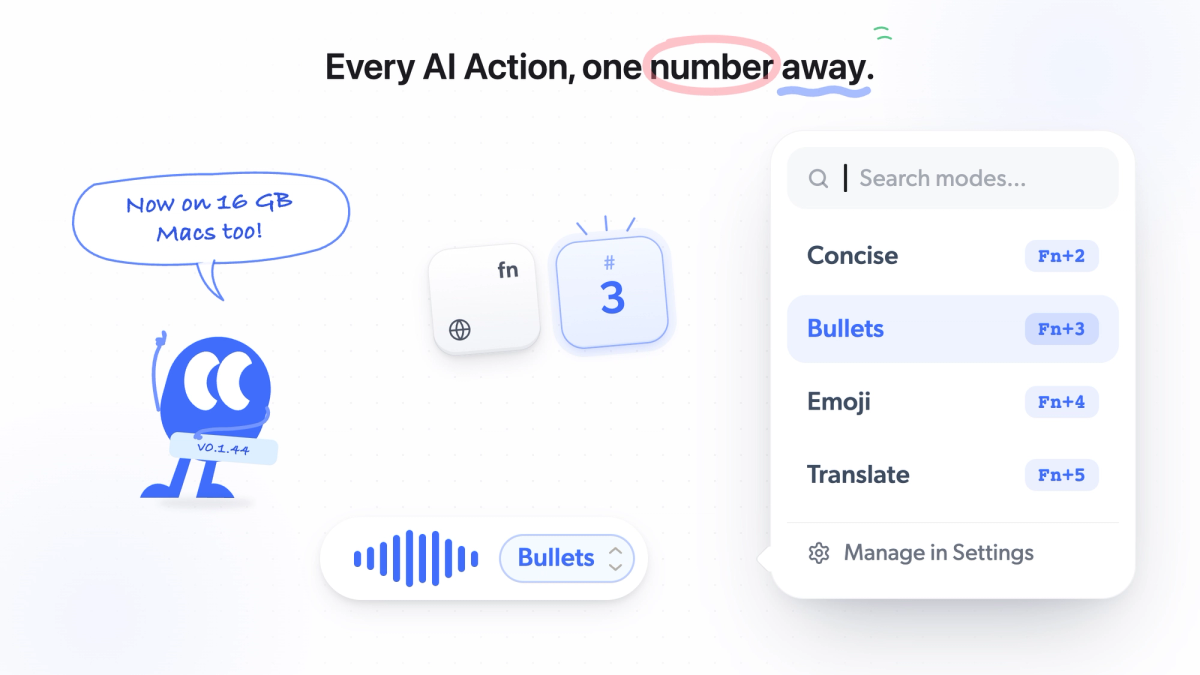
While you are still holding the key, AI Actions decide what happens to those words. They come in three groups. Transform actions reshape the text: Cleanup is the default (filler words out, punctuation in, your phrasing kept), Concise trims to the essentials, Bullets restructures into a list, Emoji drops a fitting emoji, and Translate turns it into your chosen language. Custom prompts apply any instruction you write yourself, from "rewrite as a formal email" to "summarize in two sentences". Voice actions go beyond the text box: Open sends a spoken query to Google, YouTube, Amazon, or Maps, Ask routes a question to ChatGPT, Claude, or Grok, and GIF searches what you said and opens a picker. Each action sits on a number key (Cleanup is always Fn+1; the rest follow in the order you arrange them), so you tap a digit to pick one; arrow keys work too.
It handles 40+ languages with automatic detection and copes with mixed-language sentences, which is uncommon among tools that also run cleanup locally. A personal dictionary keeps names, acronyms, and product terms spelled right; on Pro it learns new terms as you dictate. We played 13 mixed-language clips into it and nine other apps in our multilingual dictation test for Mac.
Pricing: Free with unlimited dictation and no word caps, no account required. Pro is a one-time $100 (currently $50 early bird) for three Macs with a 30-day money-back guarantee, and adds on-device AI cleanup, AI Actions, custom prompts, voice actions, and the learning dictionary. Every download starts with a 60-minute Pro trial.
What to know before choosing it: Mac only (macOS 14.2 or later, Apple Silicon). Full on-device AI needs 16GB of memory; with less, transcription still runs locally but AI cleanup requires your own AI API key. It launched in June 2026, so it is a newer tool with a shorter track record than Wispr Flow or SuperWhisper.
2. Wispr Flow
Best for: People who want polished cloud-based dictation across devices
Wispr Flow is one of the strongest choices if your priority is clean final writing with very little editing. Its main appeal is the post-processing: you speak naturally, and the app rewrites the result into something much closer to finished text.
That makes it especially useful for people writing emails, messages, and short professional communication throughout the day. It is also a strong option for users who move across Mac, Windows, iPhone, and Android, since its platform coverage is broader than many Mac-first competitors.
The tradeoff is that it is fundamentally cloud-based rather than local-first. That will not matter to everyone, but it does matter if offline use or on-device privacy is your top priority.
Pricing: Free tier available, with 2,000 words per week on Mac or Windows. Paid plans start at $15/month or $12/month (annual).
What to know before choosing it: Great writing cleanup, but not the best fit if fully local processing matters most.
→ See our full Mumble vs Wispr Flow comparison
→ Or browse all Wispr Flow alternatives we tested
3. SuperWhisper
Best for: Power users who want local dictation with more control
SuperWhisper is a strong option for users who care about local processing and want more control over how speech is handled on their Mac. Its core appeal is that it supports both local and cloud AI models while keeping the overall product focused on configurable voice-to-text workflows.
Compared with simpler dictation tools, SuperWhisper feels more like a flexible toolkit. That is a plus if you want to choose models, adjust your setup, or tune different output modes for different kinds of writing.
It also supports Mac, Windows, and iOS, which gives it broader device coverage than some Mac-only local dictation tools.
Pricing: Free tier (15 min recording). $8.49/month or $84.99/year. $249.99 lifetime.
What to know before choosing it: More complex interface than simpler tools. The modes system has a learning curve.
4. Apple Dictation
Best for: Quick notes without installing anything
Apple Dictation is the best built-in starting point for quick use. You enable it in System Settings, then start it with your Dictation shortcut, the Microphone key if your keyboard has one, or Edit > Start Dictation. It works well for short tasks, but it is still basic compared with newer AI dictation tools.
It handles short bursts well: quick texts, brief search queries, short email replies. The integration is native, it works across normal Mac text fields without installing anything, but it is still more limited than newer third-party dictation tools.
Pricing: Free, built into macOS.
Where it falls short: It stops automatically after about 30 seconds of silence and does not offer the same level of cleanup, formatting, or workflow control as modern third-party apps.
What's changing in macOS 27: At WWDC 2026 (June 8), Apple announced a new systemwide dictation experience powered by its Siri AI models. Built into the keyboard layer, it corrects spelling, punctuation, and capitalization in real time across apps. The catch: the most capable on-device model requires 12GB of unified memory (M3 Macs or later), it ships as a beta this fall, and English is the only supported language at launch. It is a real upgrade over today's Apple Dictation, but it remains a transcription-and-cleanup feature. It does not add custom prompts, voice-driven actions, meeting notes, or the workflow controls that dedicated apps provide. We will update this article once the public release ships.
5. Google Docs Voice Typing
Best for: Free, unlimited dictation inside Google Docs
If you live in Google Docs and Chrome, Voice Typing is free with no word limits. Go to Tools → Voice typing, click the microphone, and start talking. It supports 100+ languages and works reliably for general content.
Pricing: Free.
Where it falls short: It works inside Google Docs in a supported browser, but it is not system-wide dictation. No offline mode. No AI cleanup. If you need to dictate into Slack, email, or any other app, this won't help.
6. Willow Voice
Best for: Cloud AI dictation with style personalization (Mac, Windows, iOS)
Willow (YC X25) is a cloud-based dictation tool that works across Mac, Windows, and iOS. Press the Fn key and speak in any app. Its AI formats text based on context, cleaning up filler words and adjusting tone between emails and casual messages.
The free tier offers 2,000 words per week, matching Wispr Flow. Where Willow differs is that it learns your vocabulary and writing style over time, so accuracy improves the more you use it. It also has a Quiet Mode for dictating softly in shared spaces.
Pricing: Free for 2,000 words/week. $15/month or $12/month (annual).
Where it falls short: Cloud-first, similar to Wispr Flow in feature set. Relatively new, so the product is still maturing. Paid offline mode on Pro only.
7. Aqua Voice
Best for: Speed and accuracy for technical vocabulary
Aqua Voice (YC W24) stands out for raw speed: response times under 450ms in testing. Its proprietary Avalon model handles technical jargon, coding terms, and domain-specific vocabulary better than most competitors. You can build a custom dictionary of up to 800 terms, which is especially useful for developers, medical professionals, and legal teams.
It also features real-time text display as you speak, something most dictation apps don't offer. You see your words appearing live in a floating window, not just after you stop recording. Available on Mac, Windows, and iOS.
Pricing: Free with 1,000 starter words. $8/month Pro billed annually.
Where it falls short: Cloud-only, no offline mode. No Android app. The free tier is essentially a demo.
8. Voibe
Best for: Offline dictation with a focus on privacy
Voibe processes audio 100% on-device using Whisper models. No accounts required for basic use, no data collection, and sub-second startup times. It also has a Developer Mode that understands file and folder names from your active workspace, useful for anyone working with AI coding tools like Cursor.
There is no free tier anymore, so plan to pay from the start. Paid plans run $7.50/month or $59/year, and a $149 lifetime option eliminates recurring costs entirely.
Pricing: $7.50/month, $59/year, or $149 one-time. No free tier currently listed.
Where it falls short: There is no free tier anymore, so you cannot try it at length before paying. Accuracy trails behind some cloud-powered alternatives. Mac only.
9. MacWhisper
Best for: Transcribing recorded audio files, not live dictation
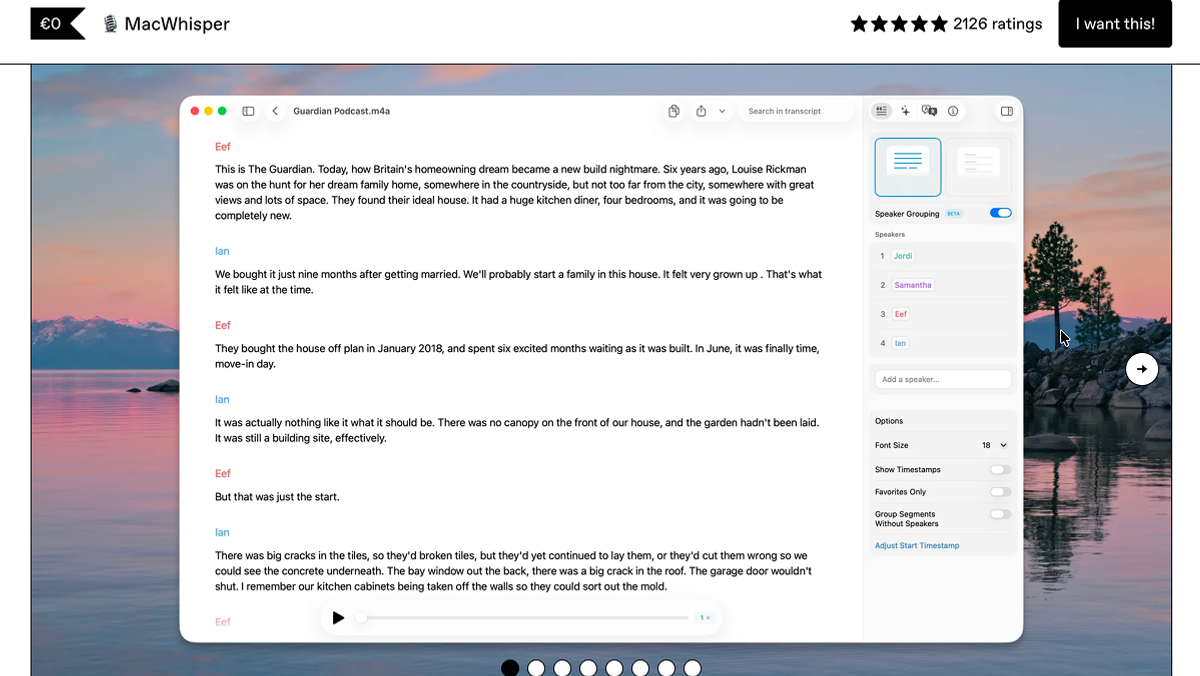
MacWhisper is different from every other tool on this list. Instead of live dictation (you speak, text appears), it's built for transcribing existing audio files: recorded meetings, interviews, podcasts, lectures.
Drag an audio file in, select a Whisper model, and get a transcript. The Pro version integrates with ChatGPT and Claude for AI-powered cleanup. It's excellent at what it does, but it's a transcription tool, not a dictation tool.
Pricing: Free for basic models. Pro version around $30 (one-time).
Where it falls short: Not designed for live, real-time dictation. If you want to speak and see text appear in Slack, this is the wrong tool.
10. VoiceInk
Best for: Open-source dictation with a one-time purchase
VoiceInk runs local Whisper models and is available as an open-source project (GPL v3). If you're comfortable building from Xcode, it's free. Otherwise, a one-time purchase of about $25-40 gets you the App Store version.
It supports 100+ languages with local processing and has built a loyal following among Mac power users, particularly on r/macapps where it's frequently recommended. The Power Mode feature lets you configure different dictation settings per app.
Pricing: Free (open source, build from source). $25 one-time for one Mac, $39 for two, $49 for three (checked September 2026).
Where it falls short: UX is less polished than commercial competitors. AI enhancement requires your own API keys. Mac only.
11. Typeless
Best for: Cross-platform dictation with a generous free tier
Typeless offers 8,000 words per week for free, the most generous free tier on this list. It works on Mac, Windows, iOS, Android, and even in the browser, making it the widest platform coverage of any tool here.
Its AI auto-editing removes filler words, fixes repetition, and keeps only your final intended phrasing when you correct yourself mid-sentence. It also adapts tone based on which app you're using and can translate your speech into other languages.
Pricing: Free for 8,000 words/week. $12/month (annual) or $30/month (monthly).
Where it falls short: Cloud-only processing. No offline mode. Monthly pricing is steep without the annual commitment.
12. Monologue
Best for: Context-aware dictation that adapts to what's on your screen
Monologue takes a different approach from most dictation tools. It uses screen context (called DeepContext) to understand what app you're in and formats output accordingly. Dictate into Slack and it writes casually. Dictate into an email and it structures professionally. You don't need to switch modes manually.
Built by the team at Every, it also includes a personal dictionary that learns your vocabulary automatically, including names, acronyms, and jargon. It supports 100+ languages and works on Mac and iOS (with Apple Watch support). The product is being used about 7,000 times a day across its user base.
Pricing: Free for 1,000 words. $10/month or $100/year
Where it falls short: Mac and iOS only, no Windows. Cloud-based, no offline mode for the main features. No one-time purchase option. More expensive than most alternatives when factoring in annual costs.
13. Microsoft Word Dictate
Best for: People who dictate mostly inside Microsoft 365
Word's built-in Dictate feature covers the basics well if your writing lives in Word, Outlook, or OneNote: real-time transcription with automatic punctuation, voice commands for formatting ("bold that," "new line"), and support for 20+ languages. Wirecutter named it the best dictation tool for most people in its 2026 testing, largely because so many people already pay for Microsoft 365.
Pricing: Included with Microsoft 365 subscriptions.
Where it falls short: It only works inside Microsoft 365 apps, not as system-wide dictation. Processing is cloud-based with no offline mode, and there is no AI cleanup beyond punctuation.
Best Offline AI Dictation Software for Mac
Five of the tools in this list can run dictation fully offline on a Mac: Mumble Dictation, SuperWhisper, Voibe, VoiceInk, and MacWhisper. Offline processing means the audio never leaves your machine, which matters for anyone dictating client work, legal notes, health information, or unreleased product details.
The practical differences between them come down to hardware requirements and what happens beyond transcription:
- Mumble Dictation runs both transcription and AI cleanup on-device on Apple Silicon Macs with 16GB of memory or more; with less memory, transcription stays local and cleanup uses your own AI key. Voice actions such as Open and Ask need a connection, everything else works offline.
- SuperWhisper runs Whisper models locally and lets you pick the model size to trade accuracy against speed. AI post-processing can stay local or use cloud models, your choice.
- Voibe is offline-only by design, with no account required for basic use. Accuracy trails the best cloud engines, but nothing you say is transmitted anywhere.
- VoiceInk is open source (GPL v3) and runs local Whisper models. AI text enhancement requires your own API keys, which technically routes that step through the cloud unless you skip it.
- MacWhisper processes recorded audio files locally rather than live dictation, so it fits offline transcription workflows rather than voice typing.
One distinction worth checking before you choose: some apps advertise "local transcription" but still send text to cloud models for AI cleanup. If full offline operation matters to you, confirm that both steps, transcription and post-processing, run on-device.
How to Choose the Right One
Skip the feature matrix. Here's the decision framework:
Start with your privacy needs. If sensitive audio must stay on your Mac, your shortlist is Mumble Dictation, SuperWhisper, Voibe, or VoiceInk. Cloud tools are off the table.
Then match your workflow:
- You want on-device AI cleanup and voice actions without a subscription: Mumble Dictation. Free unlimited tier, one-time Pro, and AI Actions that open sites or ask an AI from the same key.
- You need AI cleanup and use Mac + Windows + iPhone: Wispr Flow. The best cross-platform dictation experience.
- You want maximum control over speech models: SuperWhisper. Local transcription with optional cloud AI post-processing.
- You need precision with technical vocabulary: Aqua Voice. Built for developers and technical professionals.
- You just need something quick for occasional use: Apple Dictation. Already on your Mac, zero setup.
Frequently Asked Questions
What is the best free dictation software for Mac?
Apple Dictation is the best fully free option. It's built into macOS, requires no installation, and processes locally on Apple Silicon Macs. For a more capable free option, Mumble Dictation's free tier gives you unlimited on-device dictation in 40+ languages with no word cap; AI cleanup and voice actions are part of the one-time Pro license. Google Docs Voice Typing is unlimited and free but only works inside Google Docs in Chrome. Typeless offers the most generous free tier among third-party apps at 8,000 words per week.
Does Mac have built-in dictation?
Yes. Go to System Settings → Keyboard → Dictation and toggle it on. Press the Fn key twice (or your configured shortcut) to start dictating in any app. On Apple Silicon Macs (M1 and later), basic processing happens on-device. The built-in option works well for short tasks but has a 30-second silence timeout and no AI cleanup. A significantly upgraded systemwide dictation, announced at WWDC 2026, arrives with macOS 27 this fall.
Is there an offline dictation app for Mac?
Several. Mumble Dictation, SuperWhisper, Voibe, VoiceInk, and MacWhisper all offer local processing that works without an internet connection. Among these, VoiceInk is the most straightforward offline-only option, while SuperWhisper offers both local and cloud modes, and Mumble Dictation is on-device by default with an optional bring-your-own-key route.
What happened to Dragon Dictate for Mac?
Nuance discontinued Dragon Dictate for Mac in 2018. The only remaining Dragon option for Mac users is Dragon Medical One, which runs in a web browser. For most Mac users, modern AI-powered dictation tools offer better accuracy and a more native experience than Dragon ever did on Mac.
Can dictation software work in any Mac app?
Most dedicated dictation apps work system-wide on Mac. They operate at the system level, inserting text wherever your cursor is: email clients, Slack, Notion, code editors, browsers, anything with a text field. The main exceptions are browser-based tools like Google Docs Voice Typing, which only work inside their own environment.
What's the difference between dictation and transcription?
Dictation is real-time: you speak and text appears immediately where you're typing. Transcription processes pre-recorded audio files into text after the fact. Most tools on this list are dictation tools. MacWhisper is the exception, built specifically for transcription of recorded audio.
What is the best dictation app for MacBook?
The same apps that lead on desktop Macs lead on MacBooks: Mumble Dictation, Wispr Flow, and SuperWhisper. There is no separate "MacBook version" of any major dictation app. Two things matter more on a laptop: battery impact (local Whisper models work the CPU/GPU harder than cloud apps during transcription) and the built-in microphone, which all of these tools handle fine for dictation distance. Apple Silicon MacBooks from M1 onward run every tool on this list.
Can I use AI dictation offline on Mac?
Yes. Mumble Dictation, SuperWhisper, Voibe, VoiceInk, and MacWhisper all run fully offline on Apple Silicon Macs, processing audio on-device. Check whether AI text cleanup also stays local: in some apps transcription is offline but post-processing calls a cloud model.
Is Wispr Flow better than Apple Dictation?
For anyone who dictates daily, yes. Wispr Flow produces cleaner final text, removes filler words, and works without Apple Dictation's silence timeout. Apple Dictation wins on price (free) and zero setup. The gap may narrow when macOS 27's upgraded systemwide dictation ships this fall, but Apple's version still won't offer custom vocabulary, tone matching, or cross-platform sync.
What is a good Typeless alternative on Mac?
Typeless's main draws are its generous free tier (8,000 words/week) and cloud AI cleanup. If you want similar cleanup with local processing as an option, Mumble Dictation and SuperWhisper are the closest fits on Mac. If you want to stay cloud-based, Wispr Flow offers comparable polish with broader platform support. Typeless remains the pick if free-tier volume is your top priority.
Will Apple's new systemwide dictation replace third-party dictation apps?
Not for most serious users, at least not in its first release. The macOS 27 dictation announced at WWDC 2026 handles transcription and formatting cleanup, which covers casual use. It does not offer custom prompts, personal dictionaries, or voice actions that open a site or ask an AI, and its best on-device model requires 12GB of unified memory. Third-party apps compete on workflow depth, not raw transcription anymore.
Is there dictation software for Macintosh computers?
Yes. Macintosh and Mac are the same machines, and every app in this list is dictation software for Macintosh in the current sense: it runs on Apple Silicon Macs under macOS 14 or later. If you want voice recognition software for Macintosh that also cleans up what you say, look at Mumble Dictation, Wispr Flow, or SuperWhisper. If you only need occasional voice typing, Apple Dictation is already built in. Dragon Dictate for Mac, the Macintosh product most people remember, was discontinued in 2018.
Torn between the two biggest cloud names on this list? Our round-by-round Typeless vs Wispr Flow comparison settles which one fits your writing style.
If privacy is your deciding factor, our guide to private dictation on Mac tests which apps truly keep audio and text on-device.