Typeless vs Wispr Flow: Which Dictation App Wins in 2026?
Typeless vs Wispr Flow compared on pricing, free tiers, accuracy, coding, and privacy. Real numbers from both pricing pages, updated August 2026.
August 26, 202611 min
Typeless and Wispr Flow are the two most compared AI dictation apps of 2026, and the honest answer is that they win different rounds. Typeless gives you a far bigger free tier (8,000 words a week against Wispr Flow's 2,000) and smarter automatic editing. Wispr Flow wins on context awareness, team features, and a much cheaper month-to-month price. Both process your speech in the cloud, so if the deciding factor is keeping audio on your Mac, the answer is neither, and we cover that option at the end.
We build a dictation app ourselves, and neither of these two is it. That makes this one of the few Typeless vs Wispr Flow comparisons where the author is not grading their own homework.
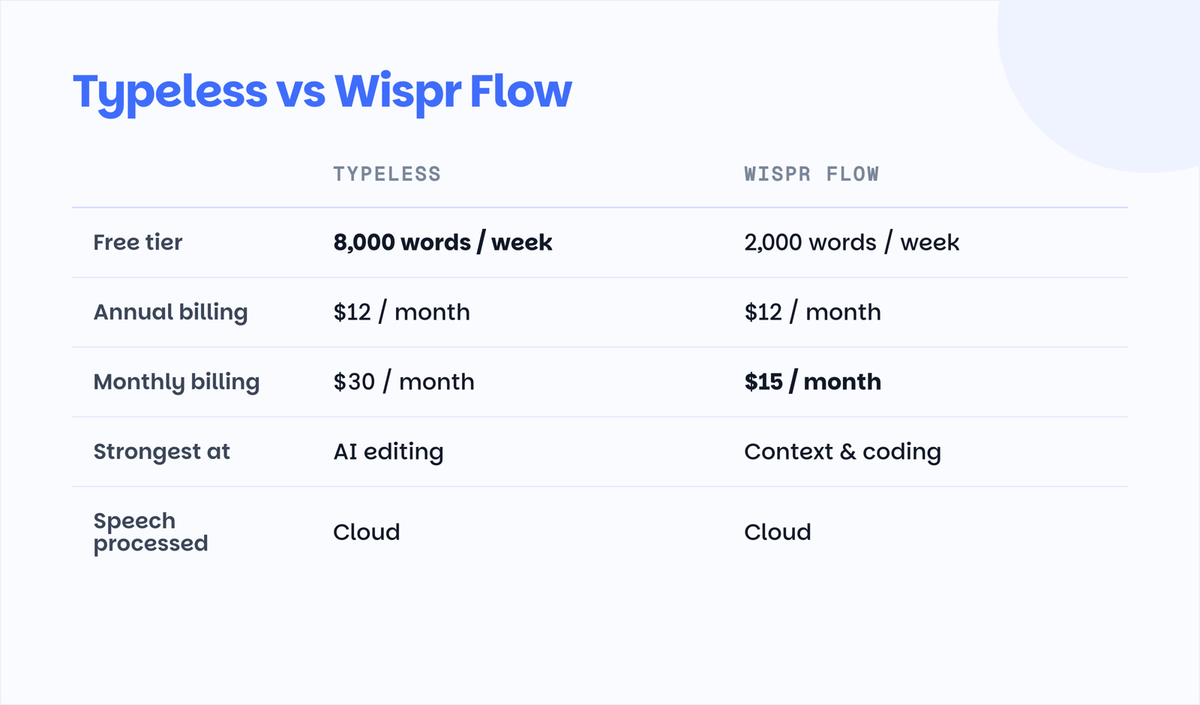
Typeless vs Wispr Flow at a glance
| Typeless | Wispr Flow | |
|---|---|---|
| Best for | Long-form writers who want AI to clean up rambling | People who dictate into many different apps all day |
| Free tier | 8,000 words/week | 2,000 words/week on desktop, 1,000 on iPhone |
| Price, annual billing | $12/month | $12/month ($144/year) |
| Price, monthly billing | $30/month | $15/month |
| Platforms | macOS, Windows, iOS, Android | macOS, Windows, iOS, Android |
| Languages | 100+ | 100+ |
| Context awareness | Basic app detection | Adjusts tone per app, reads code context in IDEs |
| AI editing | Strongest feature: removes repetition, structures lists | Good cleanup, lighter restructuring |
| Coding and IDE use | Works, but no special treatment | Recognizes variables and syntax in VS Code and Cursor |
| Where speech is processed | Cloud | Cloud |
| Offline mode | No | No |
Both pricing rows come straight from the official pricing pages as of August 2026. Prices in this category moved more than once this year, so check the linked pages before you commit.
What is Typeless?
Typeless is an AI dictation app whose pitch is that you should be allowed to ramble. You talk in messy, half-finished sentences, and it turns the mess into structured text: lists become actual lists, repeated thoughts get merged, and filler disappears. Users consistently call out this auto-editing as the reason they stay, especially for long-form writing like emails, docs, and journaling.
The free tier is the most generous of any mainstream dictation app right now at 8,000 words a week with standard accuracy. Paid Pro is $12 a month if you commit to a year. The catch is the monthly price: $30 a month, two and a half times what Wispr Flow charges month-to-month, which makes Typeless an awkward choice if you just want to try a paid tier for a month or two.
Where Typeless falls short. It is the younger product of the two, and community feedback reflects that: accuracy is described as good but less consistent than Wispr Flow's in noisy environments, and its app-awareness is more basic. There is no offline mode, and speech is processed on Typeless servers.
What is Wispr Flow?
Wispr Flow is the category's polish leader. Its signature trick is context awareness: it writes in a formal tone when you are dictating into Gmail, goes casual in Slack, and understands variable names and syntax when you talk into VS Code or Cursor. That last part made it the default recommendation in vibe-coding communities on Reddit, where developers dictate prompts and comments all day.
Pricing is $15 a month, or $144 a year which works out to $12 a month. Students get 50 percent off. The free tier is tight at 2,000 words a week on desktop, roughly fifteen minutes of talking, which most daily users burn through in a day or two. We track the full plan history, tier by tier, in our Wispr Flow pricing breakdown.
Where Wispr Flow falls short. There is no lifetime plan and no offline mode. The most common community complaints are subscription fatigue and the fact that everything you say travels to the cloud, which is also why "Wispr Flow alternative" searches keep growing. Enterprise plans do carry SOC 2 and HIPAA-ready paperwork, but that is compliance for companies, not on-device processing for you.
Head-to-head: the six rounds that decide it
Free tier. Typeless, and it is not close: 8,000 words a week against 2,000. If you dictate occasionally, Typeless free might be all you ever need. Round to Typeless.
Price. A tie that depends entirely on billing. Annual is $12 a month either way. Month-to-month, Wispr Flow's $15 beats Typeless at $30 decisively. If you are commitment-averse, Wispr Flow is half the price. Round split.
AI editing. Typeless restructures what you said; Wispr Flow cleans up what you said. If your dictation style is stream-of-consciousness, Typeless produces noticeably more finished text. Round to Typeless.
Context awareness and coding. Wispr Flow adapts tone per app and reads IDE context, and developer forums treat it as the default for voice-driven coding. Typeless works fine in an IDE but treats it like any other text field. Round to Wispr Flow.
Platforms and languages. Both cover Mac, Windows, iOS, and Android, and both claim 100+ languages. Wispr Flow's free tier is unlimited on Android, which is an odd but real perk. Round even, slight edge Wispr Flow on mobile generosity.
Privacy. Neither offers on-device processing. Your audio goes to their servers on every plan, free or paid. If that is disqualifying, skip to the next section. Round to nobody.
Pros and cons at a glance
Typeless pros
- Free tier of 8,000 words a week, the largest of any mainstream dictation app
- AI editing that restructures rambling speech into lists, steps, and clean prose
- Same $12/month annual price as Wispr Flow
- Covers macOS, Windows, iOS, and Android with 100+ languages
Typeless cons
- $30/month on monthly billing, double Wispr Flow's price
- Younger product with less consistent accuracy in noisy conditions
- Basic app awareness, no code-specific handling in IDEs
- Cloud processing only, no offline mode
Wispr Flow pros
- Context awareness that adapts tone per app and understands code in VS Code and Cursor
- $15/month with no annual commitment, plus 50 percent student discount
- Mature, polished product with a large user community
- Unlimited free dictation on Android
Wispr Flow cons
- Desktop free tier of 2,000 words a week runs out fast with daily use
- No lifetime plan, subscription only
- Lighter editing: it cleans your words rather than restructuring them
- Cloud processing only, no offline mode
Enterprise and teams: paperwork vs on-device
Both companies now sell compliance, which tells you where the market pressure is. Typeless Enterprise offers SSO, SCIM provisioning, audit logs, and enforced HIPAA controls on custom pricing. Wispr Flow Enterprise counters with SOC 2 Type II, ISO 27001, a HIPAA-ready BAA, SSO/SAML, and MDM support, and its Pro tier already includes team billing.
For a team that must clear a security review, Wispr Flow's certification list is currently longer and better documented. The distinction worth keeping in mind: certifications govern how a vendor handles your data in their cloud. They do not change the architecture. On both platforms, every plan, audio still leaves the laptop. Organizations whose rule is "recordings never leave the device" are outside what either enterprise tier can promise, which is the case where local processing stops being a preference and becomes a requirement.
The real cost over a year
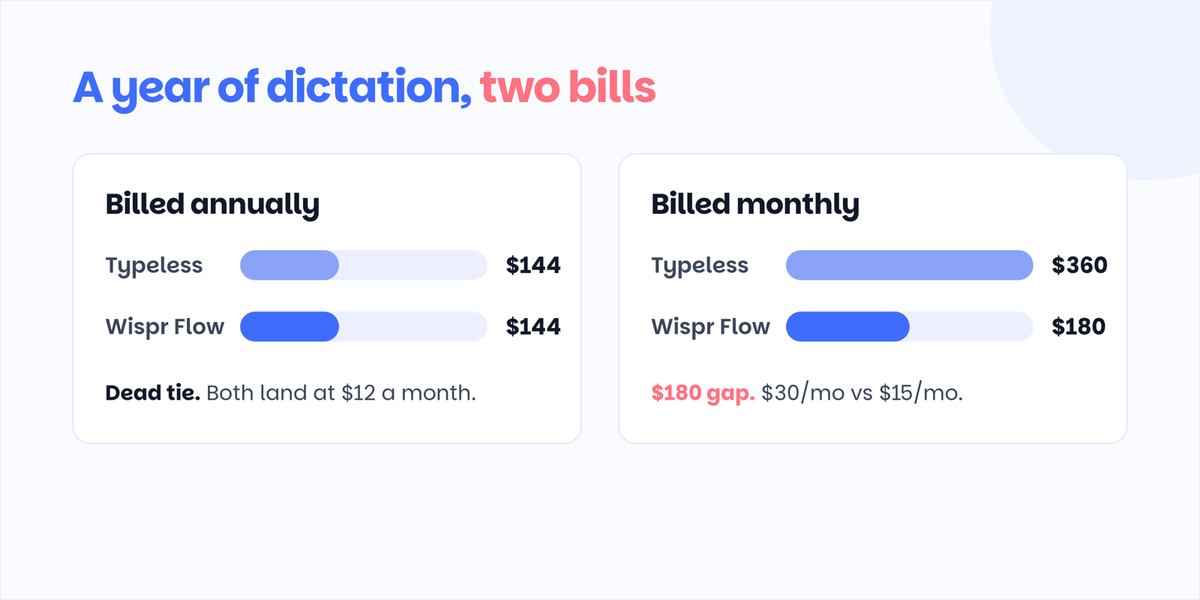
Annual billing: both land at $144 a year, so price stops being the tiebreaker the moment you commit for a year.
Monthly billing tells a different story. A year of month-to-month Typeless is $360; the same year of Wispr Flow is $180. If you want flexibility, Wispr Flow costs half as much for it.
The cheapest realistic setup is also worth naming: Typeless free at 8,000 words a week covers light and moderate use at $0, which is more than most people dictate. Wispr Flow free, at 2,000 words, is closer to a trial than a tier.
Choose Typeless if...
- You write long-form content by voice and want the app to do real editing, not just transcription
- Your weekly volume fits inside 8,000 words and you would rather pay nothing
- You are happy to commit annually if you upgrade
Choose Wispr Flow if...
- You dictate into many apps and want tone to adapt automatically
- You code by voice in VS Code or Cursor
- You want the cheaper month-to-month price, or you are a student (50 percent off)
If you do not want your voice in the cloud at all
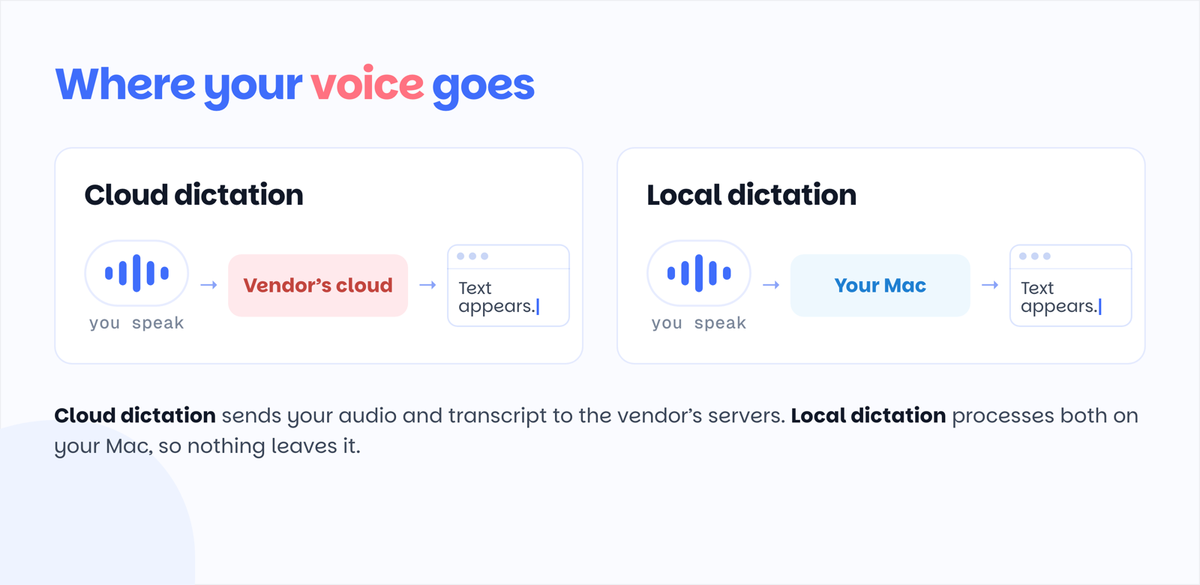
Both apps in this comparison send your audio to their servers. That is fine for most people and a dealbreaker for some: client work under NDA, legal and finance teams, or anyone who has watched this year's parade of SaaS breach disclosures.
The third path is local dictation. Mumble Dictation runs transcription and AI cleanup on your Mac itself on Apple Silicon, so speech can go from your voice to text without leaving the machine. On-device dictation is free without word caps, and the paid upgrade is a one-time license rather than a subscription. It is Mac-only and it does not try to match Wispr Flow's cross-platform reach, which is exactly the trade: fewer platforms, zero cloud dependency. We compare that trade in detail in Mumble vs Wispr Flow, and our roundup of the best dictation software for Mac covers where every major app, these two included, actually processes your speech.
Accuracy and languages: closer than the marketing suggests
Both apps claim support for 100+ languages, and both are built on modern cloud speech models, so raw transcription accuracy is high and close between them for clear English speech. The differences show up at the edges.
Wispr Flow has the longer track record and generally gets described as the more consistent of the two in imperfect conditions: background noise, fast speech, mid-sentence direction changes. Its personal dictionary and snippet system also help it stick the names, jargon, and phrases you use repeatedly.
Typeless competes less on raw recognition and more on what happens after recognition. Its editing layer means the text that lands in your document often needs fewer manual fixes even when the raw transcript had rough patches. For accented English, reports on both are mixed in the way they are for every cloud dictation product, and the sensible move is to burn part of each free tier on your own voice before paying either company.
One practical note for multilingual users: both handle language switching, but neither lets you verify what happens to your audio afterward. Cloud processing applies in every language.
What users actually say
Read enough community threads and the pattern is consistent on both sides.
Wispr Flow's fans describe it as the app that made dictation feel invisible: press the key, talk, and correctly formatted text appears in whatever app has focus. The recurring complaints are about the model, not the product: the subscription price over time, the tight free tier, and unease about audio leaving the machine. Those three complaints are, almost verbatim, why searches for Wispr Flow alternatives keep climbing.
Typeless's fans talk about the writing, not the typing. The app gets recommended to people who think out loud, draft by rambling, and want structure imposed afterward. The recurring complaints mirror its youth: occasional accuracy wobbles, fewer integrations, and that $30 month-to-month price, which comes up in nearly every pricing discussion.
Neither community complains much about the other side's strength, which tells you the products genuinely sit in different corners: Wispr Flow is a better input method, Typeless is a better writing assistant.
FAQ
Is Typeless better than Wispr Flow?
Typeless is better for long-form writing thanks to stronger AI editing and a free tier four times larger. Wispr Flow is better for dictating across many apps and for coding, and it is much cheaper month-to-month at $15 against $30. On annual billing both cost $12 a month, so the decision comes down to how you write, not what you pay.
How do the free plans compare?
Typeless free includes 8,000 words per week. Wispr Flow free includes 2,000 words per week on desktop and 1,000 on iPhone, with unlimited dictation on Android. For desktop users, Typeless's free tier is four times larger.
Does Typeless or Wispr Flow work offline?
No. Both process speech on their servers and need an internet connection. If you need dictation that works offline or keeps audio on-device, look at local-first Mac apps such as Mumble Dictation instead.
Which is better for coding by voice?
Wispr Flow. It recognizes code syntax and variable names inside editors like VS Code and Cursor, which is why developer communities recommend it for voice-driven coding. Typeless works in an IDE but without code-specific handling.
Is my audio private with these apps?
Both companies state standard security practices, and Wispr Flow offers SOC 2 and HIPAA-ready compliance on enterprise plans. But on every plan of both apps, audio is processed in the cloud rather than on your device. Cloud processing under good compliance is still cloud processing.
Both apps here are cloud services; if that is the dealbreaker, our guide to private dictation on Mac covers the on-device alternatives in depth.