Private Dictation on Mac: What Really Stays On-Device (2026)
Which Mac dictation apps keep your audio and text on-device? A privacy comparison of 7 apps, the 60-second offline test, and what certifications actually cover.
Updated September 3, 202612 min
If privacy is your first requirement in a Mac dictation app, the honest shortlist is short. Only a handful of apps process both your audio and your text on the Mac itself: Mumble Dictation, Apple's built-in dictation, VoiceInk, and the local modes of Superwhisper and MacWhisper. The popular cloud apps, Wispr Flow and Typeless included, send your speech to their servers on every plan. The test that cuts through every marketing page: turn off Wi-Fi and try to dictate. This guide runs that test for you, app by app.
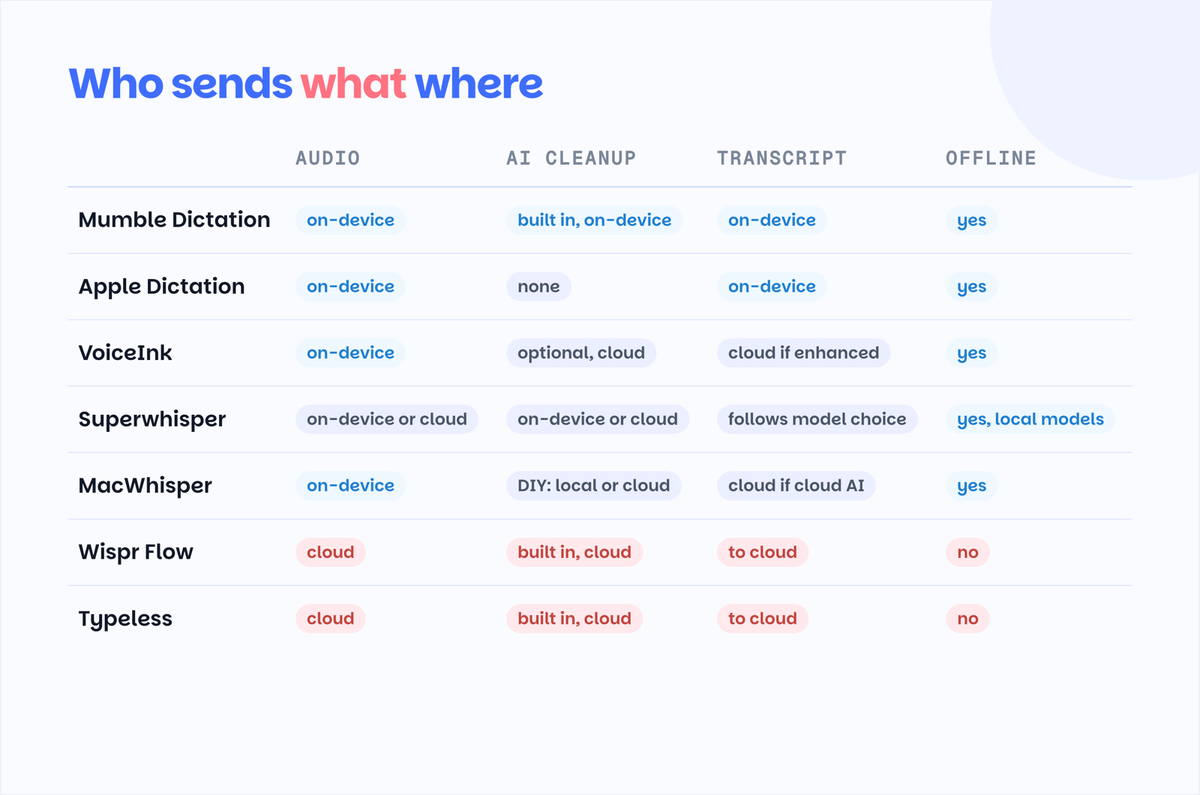
Who sends what where
The question that matters is not "does this app mention privacy" but "what leaves the machine." Two things can leave: your audio, and the text made from it. Here is where each app stands, checked against official documentation in August 2026.
| App | Audio | AI cleanup of the transcript | Transcript | Works offline | Pricing model |
|---|---|---|---|---|---|
| Mumble Dictation | On-device | Built in, on-device, runs by default (16 GB+ Macs) | On-device | Yes | Free dictation; one-time license for AI features |
| Apple Dictation | On-device (on-device mode) | None, raw transcript | On-device | Yes | Free, built in |
| VoiceInk | On-device | Optional, cloud (sends text only) | Cloud only if enhanced | Yes | One-time $29 |
| Superwhisper | On-device or cloud, your pick | On-device (S1-mini) or cloud models | Follows your model choice | Yes, local models | Free tier; paid unlocks more models |
| MacWhisper | On-device | DIY: your own cloud keys or local Ollama | Cloud only with cloud AI | Yes | One-time €64 (Pro) |
| Wispr Flow | Cloud, every plan | Built in, cloud | To cloud | No | $15/mo or $144/yr |
| Typeless | Cloud, every plan | Built in, cloud, strongest restructuring | To cloud | No | $12/mo annual |
Three patterns hide in that table. Fully local apps tend to charge once instead of monthly, because they are not paying for server time with your subscription. Hybrid apps are private only in the mode you actually selected, which is easy to get wrong. And the cloud apps are not "less finished" products, they are often the most polished ones; they simply made a different architecture choice.
The column worth reading twice is AI cleanup. Dictation has two stages, recognition and cleanup, and each can run locally or in a cloud. Several apps that transcribe on-device still offer to send your transcript to a cloud model to polish it, which quietly reopens the door you just closed: the audio stayed home, the words did not.
What "private dictation" actually means
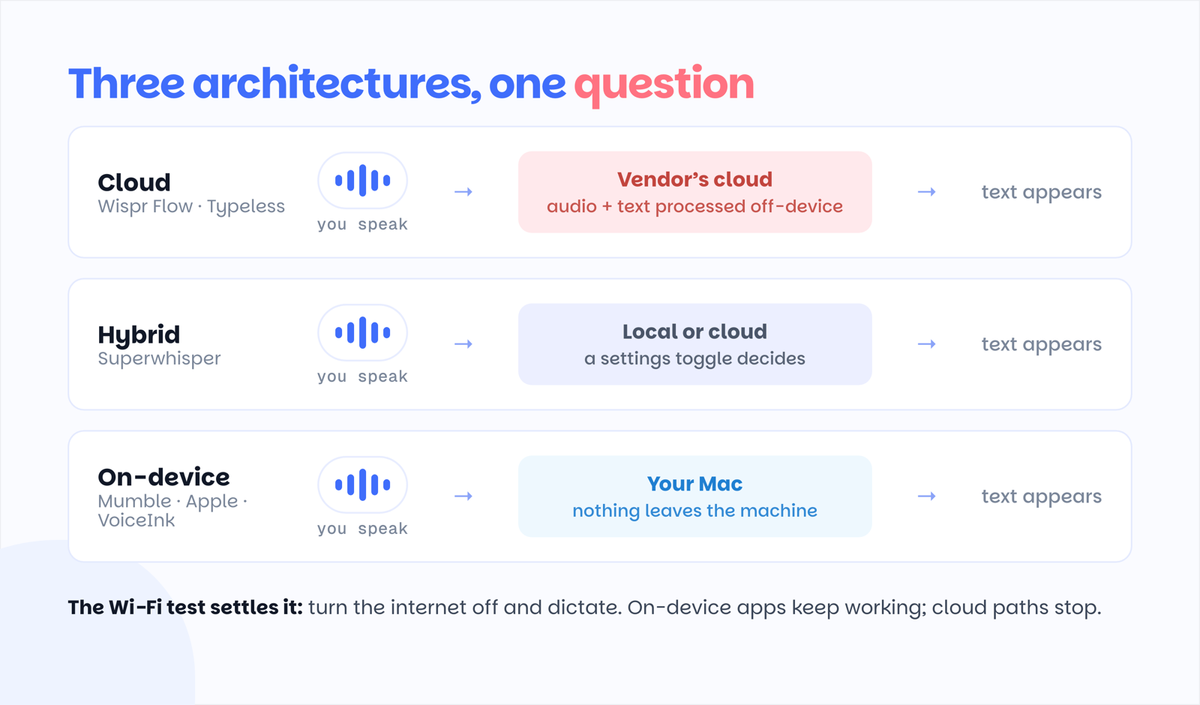
Dictation apps fall into three architectures, and the label on the pricing page will not tell you which one you are buying. Remember that the question applies twice, once for speech recognition and once for the AI cleanup of the transcript; an app can be local at one stage and cloud at the other.
Cloud dictation. Your Mac records audio and ships it to the vendor's servers, where speech recognition and any AI cleanup happen. Wispr Flow and Typeless work this way on every tier. This is not a flaw, it is how they deliver heavy models and context features on any hardware. But your voice, and everything you said, transits and is processed off-device. We compared those two cloud apps in detail in Typeless vs Wispr Flow.
Hybrid dictation. The app can run locally or in the cloud, and a setting decides. Superwhisper is the clearest example: its local models run fully on Apple Silicon, and its cloud models do not. Hybrid privacy is real but conditional. If an update, a new default, or a helpful onboarding screen switches your model, your architecture switches with it.
On-device dictation. Recognition and processing run on your Mac, full stop. Apple's built-in dictation in on-device mode, VoiceInk, MacWhisper for file transcription, and Mumble Dictation work this way. The practical tell: these apps keep working in airplane mode.
One more distinction worth keeping straight: certifications are not architecture. SOC 2, ISO 27001, and HIPAA-ready agreements, which the cloud vendors' enterprise tiers rightly advertise, govern how responsibly a company handles your data in its cloud. They do not mean the data stays with you. If your rule is "recordings never leave the device," no certificate substitutes for a local architecture.
Private by default, by configuration, or never
Once you read both stages together, the market sorts into three tiers, and the tier matters more than any single feature.
Private by default. Recognition and cleanup both run on the machine, out of the box, with nothing to configure. Mumble Dictation is built this way: the cleanup model ships inside the app and runs by default on Apple Silicon Macs with 16 GB or more (the "save memory" local model tier; lower-memory Macs fall back to bring-your-own API for cleanup). Privacy here is the path of least resistance, which is exactly what makes it dependable: the private setup and the default setup are the same setup.
Private by configuration. The pieces exist, but your choices decide. Superwhisper genuinely belongs here in 2026: it ships S1-mini, a small on-device language model that can clean up and format text without a network request, alongside a model picker full of cloud options like GPT and Claude. Pick local models at both stages and it is private; pick the marquee cloud modes and it is not. MacWhisper sits at the DIY end of the same tier: wire it to a local model through Ollama or LM Studio and the whole pipeline stays home, but you are the one laying the pipe. VoiceInk is the simplest case: local until you flip on its cloud enhancement.
Private never. Wispr Flow and Typeless process everything in their clouds on every plan. Their cleanup is often the best in the business; it just cannot be private, at any price or setting.
The practical rule that falls out: if privacy must survive contact with real life, software updates, helpful defaults, tired Friday afternoons, prefer the tier where privacy is not a setting someone can change. Configuration-tier privacy is real, but it is only as durable as your attention to the configuration.
The 60-second test anyone can run
You do not need to read a privacy policy to find out where your voice goes. You need one minute:
- Download the app and let it finish any model download it wants to do. Local apps pull their speech model once, up front, and that download needs internet.
- Turn off Wi-Fi. Unplug Ethernet if you have it.
- Open any notes app and dictate a sentence.
If text appears, recognition runs on your Mac. If the app errors, stalls, or silently waits for a connection, your audio is processed on someone else's computer. Run the test again after major app updates; defaults change.
Two caveats for fairness. First, a cloud app failing this test is not "caught lying," most of them say plainly that they are cloud services. Second, some hybrid apps pass the test in local mode and fail it in cloud mode, which is exactly why the test is worth running on your own configuration rather than trusting a feature list. And run it with any AI enhancement turned on: an app can transcribe offline, then wait for a connection to polish the text, which tells you exactly where that stage runs.
The confidential-work scenario
The people who ask us about private dictation are rarely hobbyists. They are lawyers drafting privileged memos, consultants under NDA, finance people whose compliance team reads software agreements, founders talking through unannounced plans, therapists writing session notes. For that work, the calculus is simple: every system that touches the content is something you may have to disclose, assess, or defend.
On-device dictation removes the question. If audio and text never leave the Mac, there is no vendor processing agreement to review for the dictation step, no new subprocessor in your stack, and no cloud breach that can include your voice notes. That is also why "can I use dictation for client work" is better answered by architecture than by any vendor's promise.
A note on scope: if your field has formal regulatory requirements, medical documentation for example, you need tools and processes reviewed for that specific regime. This guide is about keeping ordinary confidential work on your machine, not about regulatory compliance.
The apps, honestly
Mumble Dictation runs both stages, transcription and AI cleanup, on your Mac on Apple Silicon, with the cleanup model built in and on by default rather than something you wire up or select. Full on-device AI needs a 16 GB Mac; on 8 GB machines dictation still runs locally and cleanup can use your own API key instead. Dictation is free with no word caps in 40+ languages; a one-time license, not a subscription, unlocks the on-device AI layer: cleanup, AI Actions, a dictionary that learns your words. It is Mac-only and newer than the big names, which is the honest trade for its architecture. It passes the Wi-Fi test with everything on. For how it handles two languages inside one sentence, see our multilingual dictation test.
Apple Dictation is the free baseline already on your Mac, and in on-device mode on Apple Silicon it is genuinely private. The trade is accuracy and formatting: it is noticeably weaker than Whisper-class apps on uncommon words, names, and punctuation, and it does no cleanup. Fine for short notes; frustrating for long-form work.
VoiceInk is a one-time $29 app running local Whisper-class models, with custom vocabulary and a rewrite command. Its AI enhancement is optional and cloud-based, and to its credit the app is explicit that only transcribed text, never your voice, is sent when you enable it. Leave enhancement off and everything stays local.
Superwhisper is the hybrid power tool, and credit where due: beyond local Whisper transcription it ships S1-mini, an on-device language model for cleanup and tone, so a fully local pipeline is possible without plumbing. The catch is that its marquee modes run on cloud models like GPT and Claude, so privacy follows your model picker. For sensitive work, pin both stages to local models and re-check after updates.
MacWhisper covers both live dictation and file transcription, locally, with a one-time €64 Pro license. Its AI layer is bring-your-own: connect a cloud provider key, or point it at a local model through Ollama or LM Studio, which makes it the tinkerer's route to a fully on-device pipeline including cleanup.
Wispr Flow and Typeless are the polish leaders, and both are cloud services on every plan. If privacy is preference rather than requirement, they are excellent products; our head-to-head comparison covers which fits which writing style. If audio must stay on the machine, neither qualifies, at any price.
For the wider field beyond the privacy lens, our roundup of the best dictation software for Mac covers accuracy, features, and pricing across every major app.
What private costs over three years
Privacy in this category is, unusually, the cheaper option over time, because local apps do not carry the vendor's server bill inside a subscription.
Three years of Wispr Flow on the annual plan is $432. Typeless on annual billing lands in the same place. Over the same three years, VoiceInk is the $29 you paid once, Apple Dictation is $0, and Mumble Dictation is free for dictation itself plus a single one-time license if you want the on-device AI layer. Superwhisper sits between, with a usable free local tier and paid plans for larger models.
The pattern is structural, not promotional. Cloud dictation has per-user server costs forever, so it must bill you forever. On-device dictation spends your Mac's own silicon, which you already bought. If you dictate heavily for years, the architecture that protects your audio also protects your wallet.
The accuracy trade-off, honestly
The classic objection to local dictation is accuracy, and a few years ago it was decisive. It is much less true on Apple Silicon in 2026. Whisper-class models running locally are close enough to cloud recognition for everyday English that most people cannot tell transcripts apart, and they handle accents and technical vocabulary far better than the built-in baseline.
The honest ranking today: cloud models still win by a nose on messy audio, heavy accents, and rare names; local Whisper-class apps (Mumble, VoiceInk, Superwhisper local, MacWhisper) sit just behind and improve with every model release; Apple's on-device dictation trails the pack on anything beyond plain prose.
Two practical notes. Local model quality depends on your hardware: newer Apple Silicon with more memory runs bigger, better models. And formatting is a separate skill from recognition; apps with an on-device cleanup layer will produce more finished text than raw transcription at the same recognition accuracy.
Your dictation is private. Is the rest of the pipeline?
One trap catches people who get everything above right: the dictation was on-device, and then the text landed in an app that syncs to a cloud by default. Apple Notes with iCloud on, Google Docs, Notion, most email drafts: the moment your words arrive there, they are on someone's servers under that app's policies, no matter how private the dictation step was.
That is not a reason to abandon those tools; it is a reason to be deliberate. For genuinely sensitive drafts, dictate into a local-only destination (a local file, an editor without sync, a notes app with sync off for that notebook) and move text out on your own terms. Private dictation controls one step of the pipeline. The pipeline is only as private as its most talkative step.
FAQ
What Mac dictation app should I use if I care most about privacy?
Use an app that processes speech on-device: Mumble Dictation, Apple's built-in dictation in on-device mode, VoiceInk, or Superwhisper pinned to its local models. All of them keep working with Wi-Fi off, which is the simplest proof that your audio stays on the Mac.
Which Mac dictation apps work offline and keep audio private?
Mumble Dictation, Apple Dictation (on-device mode), VoiceInk, and MacWhisper work offline, and Superwhisper does when using local models. Offline capability and audio privacy are the same property: if recognition runs without internet, your audio is being processed locally.
Is Apple Dictation private?
In on-device mode on Apple Silicon Macs, yes: speech is processed locally. Its accuracy trails modern Whisper-based apps, especially on names and technical vocabulary, so many people who start there move to a local third-party app for serious work.
Can I use dictation for confidential client work?
Yes, if the app is on-device. When audio and text never leave your Mac, dictation adds no new vendor to disclose or assess for that content. For fields with formal regulatory regimes, use tools reviewed for those specific requirements rather than relying on any general-purpose app's claims.
Do privacy certifications mean my audio stays private?
No. SOC 2, ISO 27001, and HIPAA-ready agreements describe how a vendor protects data in its cloud. They are meaningful for cloud services, but they do not change the architecture: the audio still leaves your machine. Only on-device processing keeps it with you.