Best Multilingual Dictation Apps for Mac in 2026 (Tested)
We played the same 13 Spanish, Hindi, German, French, Chinese, and Japanese clips into 9 Mac dictation apps. Here is which ones really switch languages mid-sentence, split by cloud and on-device.
September 3, 202621 min
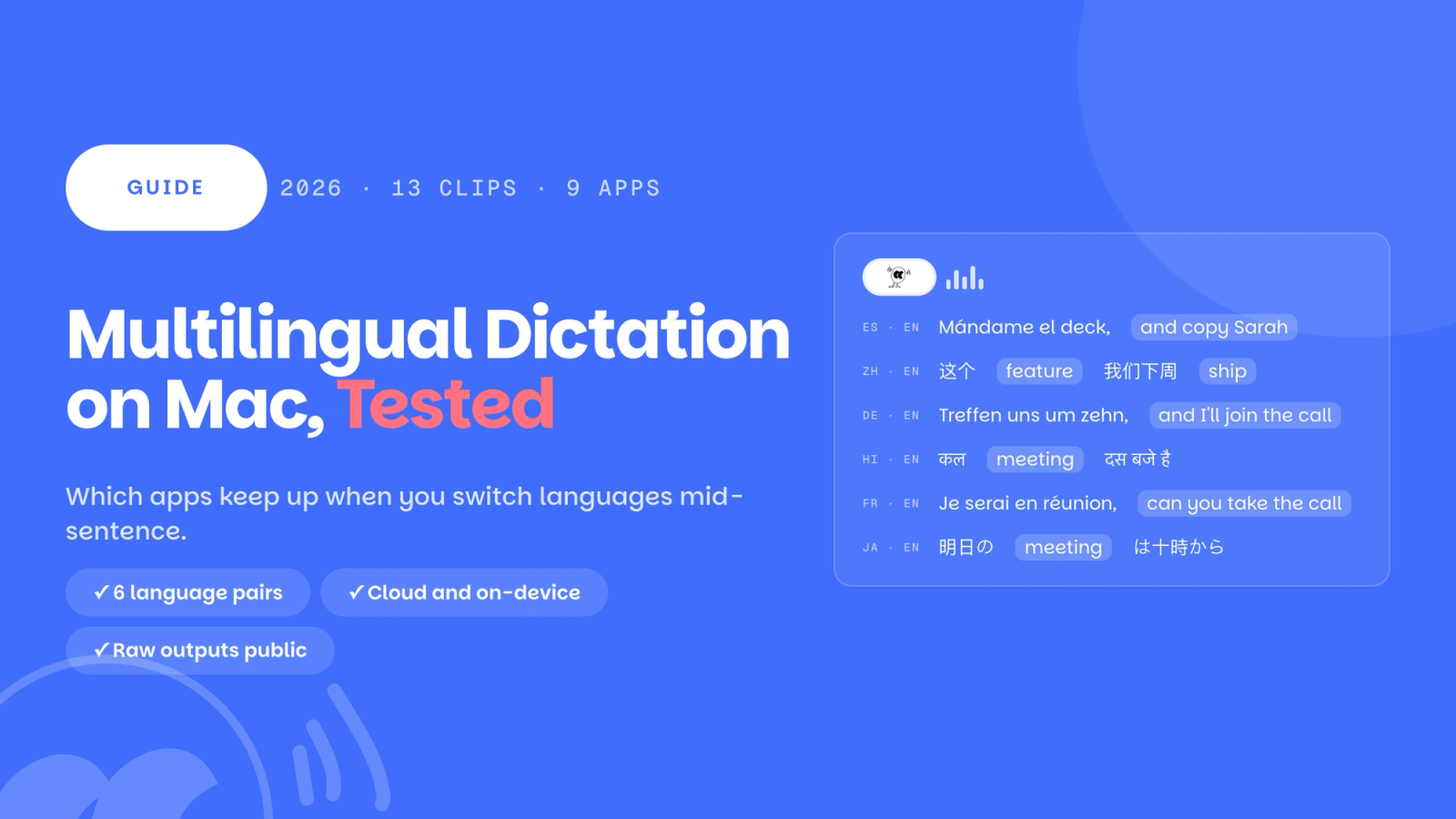
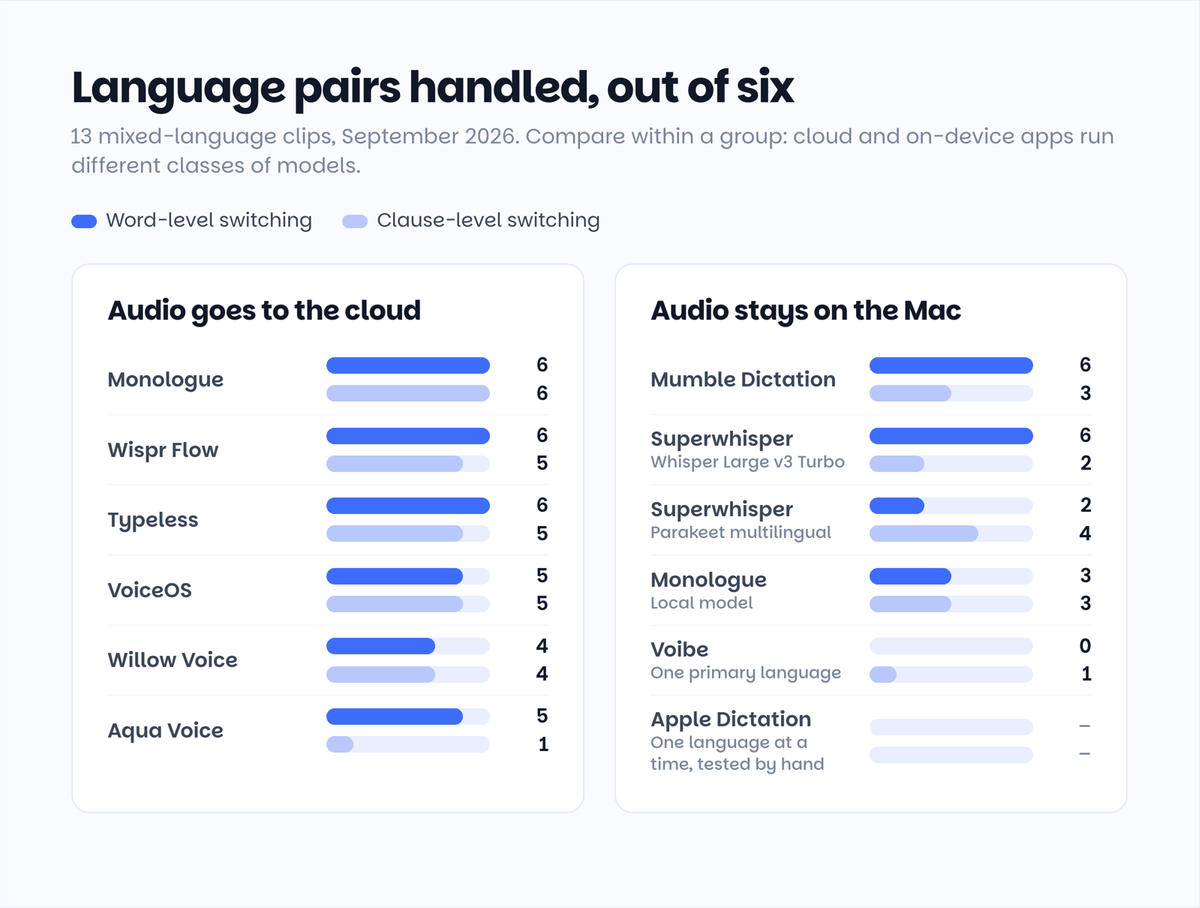
If you speak two languages in the same sentence, most Mac dictation apps will handle the words you borrow from English, and only a few will handle a sentence that changes language halfway through. We played the same 13 mixed-language clips (Spanish, Hindi, German, French, Chinese, and Japanese, each mixed with English) into 9 dictation apps and tested Apple Dictation by hand. The cloud apps Monologue, Wispr Flow, and Typeless handled almost every switch. Among apps that keep your audio on the Mac, Mumble Dictation handled every language pair at the word level and is the one to pick if your audio cannot leave the machine.
How this article was made. We are the team behind Mumble Dictation, one of the apps in this test. Every app ran the same 13 clips on the same Mac under the same scoring rules, no app paid to be here, and there are no affiliate links. The full raw outputs and the audio clips are public so you can check our scoring yourself: see every clip and every output. Where Mumble lost, we say so below.
Quick picks
If your audio can go to the cloud
- Best overall for mixed-language sentences: Monologue. Handled every language pair at both levels, including the Japanese sentence most apps missed. Its website promises you can switch to Spanish mid-sentence, and in our test it kept up across all six language pairs. Free for 1,000 words, then $15 a month, or $144 a year.
- Most literal transcriber: Wispr Flow. Every pair at word level, five of six at clause level, and the one app that never rewrote a word of what we said into another language. Free for 2,000 words a week, then $15 a month.
- Best free tier: Typeless. Every pair at word level, five of six at clause level, and 8,000 words a week free, four times Wispr Flow's allowance.
If your audio has to stay on your Mac
- Best on-device: Mumble Dictation. Both the voice model and the language model run locally, it detects the language automatically, and it handled English words dropped into Spanish, Hindi, German, French, Chinese, and Japanese sentences. Free with no word cap; Pro is $100 once, currently $50.
- Best if you want to pick your own model: Superwhisper. Every word-level pair with Whisper Large v3 Turbo; European languages only with the Parakeet model it recommends first. $8.49 a month, or $249.99 once.
Special cases
- Hinglish: every app writes it differently. Wispr Flow keeps English words in Latin letters, Mumble and Typeless write them in Devanagari, Willow and Aqua Voice romanize the whole sentence. None of these is wrong; pick the style you read. We score it separately.
- Japanese with an English clause: only Monologue, Typeless, and VoiceOS got it right.
The cloud apps at a glance
| App | Word-level pairs | Clause-level pairs | What that means | Auto-detect | Hinglish style | Free tier | Price |
|---|---|---|---|---|---|---|---|
| Monologue | 6 of 6 | 6 of 6 | Handles both levels | Yes | Devanagari, English mostly kept | 1,000 words | $15/mo, $144/yr |
| Wispr Flow | 6 of 6 | 5 of 6 | Handles both levels | Yes, per session | Keeps Latin letters | 2,000 words/week | $15/mo, $12/mo yearly |
| Typeless | 6 of 6 | 5 of 6 | Handles both levels | Yes, off by default | English in Devanagari | 8,000 words/week | $12/mo yearly, $30/mo monthly |
| VoiceOS | 5 of 6 | 5 of 6 | Handles both levels; no Hindi | Among ticked languages | Not supported | 100 uses/week | $12/mo yearly |
| Willow Voice | 4 of 6 | 4 of 6 | Partial at both levels | Yes | Romanized | Weaker model | $15/mo, $12/mo yearly |
| Aqua Voice | 5 of 6 | 1 of 6 | Word level only | Yes | Romanized | 1,000 words | $8/mo |
The on-device apps at a glance
| App | Word-level pairs | Clause-level pairs | What that means | Auto-detect | What runs on the Mac | Free tier | Price |
|---|---|---|---|---|---|---|---|
| Mumble Dictation | 6 of 6 | 3 of 6 | Every pair at word level, half at clause level | Yes | Voice model and language model | Unlimited | $100 once, now $50 |
| Superwhisper, Whisper Large v3 Turbo | 6 of 6 | 2 of 6 | Every pair at word level, clause level weak | Yes | Voice model; cleanup local or cloud | Unlimited Whisper models | $8.49/mo, $249.99 once |
| Superwhisper, Parakeet multilingual | 2 of 6 | 4 of 6 | European languages only | Yes | Same, European languages only | Unlimited Whisper models | $8.49/mo, $249.99 once |
| Monologue, Local model | 3 of 6 | 3 of 6 | European languages only | Yes | Voice model, 25 languages | 1,000 words | $15/mo, $144/yr |
| Voibe | 0 of 6 | 1 of 6 | One primary language at a time | No | Voice model, Apple Silicon only | None, 7-day trial | $7.50/mo, $149 once |
Single-language by design. Voibe asks you to pick one primary language and has no auto-detect; with English selected, the non-English halves of our sentences came back as unrelated English, which is why its counts are near zero. Apple Dictation supports 54 languages, 29 of them on-device, but only one at a time per session, switched manually, and was tested by hand rather than through the clips. Both are covered in their own sections below.
Word-level and clause-level counts are the number of language pairs (out of six) where the app kept both halves of the sentence in their original language. Transliteration style (the Hinglish column) is never counted against an app. Prices were checked on each product's official pricing page on September 3, 2026; links are in Sources at the end.
What "multilingual" actually means
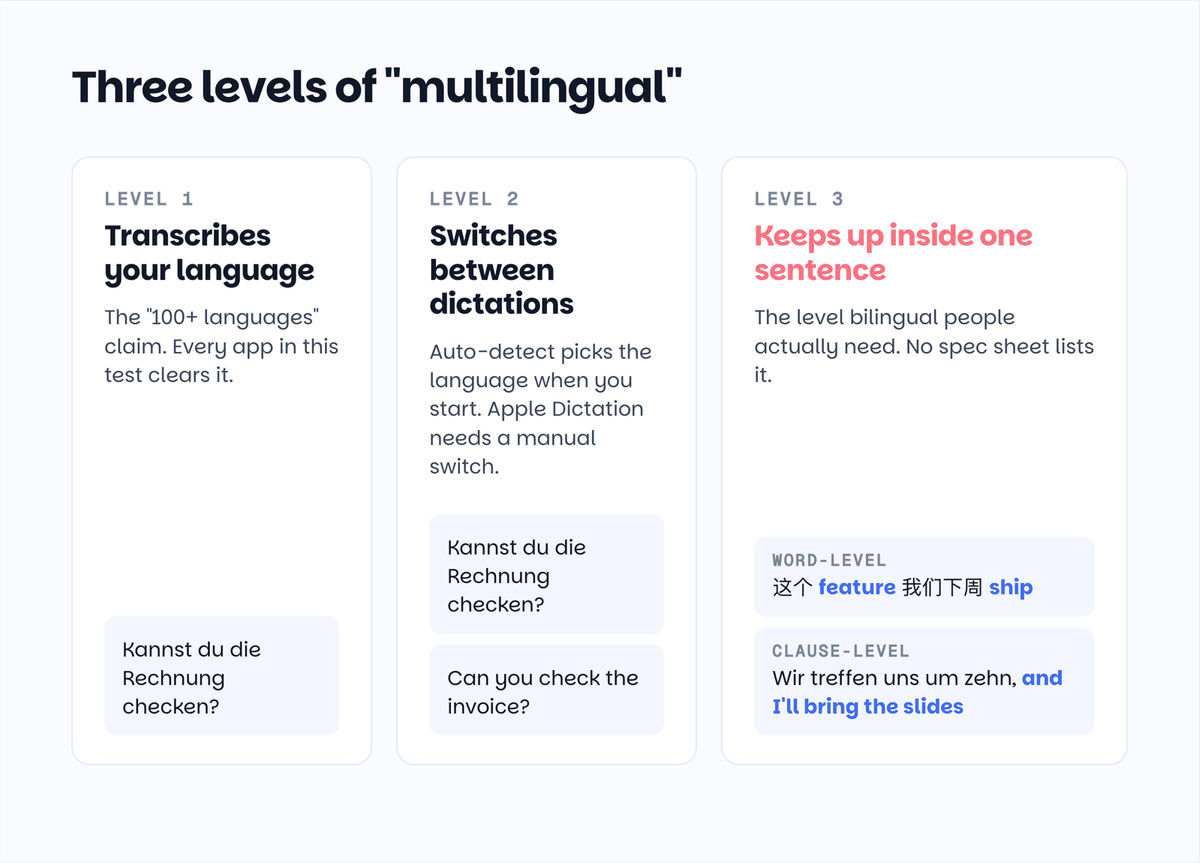
Every app on this list says it supports 40, 50, or 100 languages. That number answers a question almost nobody asks. Bilingual people do not dictate in 100 languages, they dictate in two, often inside the same sentence. So there are really three levels of multilingual support, and most apps stop at the second.
Level 1: the app can transcribe your language. This is the "100+ languages" claim. Modern speech models cleared this bar years ago, and in our test no app failed on a single-language sentence in a language it lists.
Level 2: you can switch languages between dictations without opening Settings. Apple's built-in Dictation makes you click a language chip or press the Globe key. Most third-party apps detect the language automatically at the start of each dictation. Wispr Flow's own help center is precise about the limit here: "Detection is per session, not per word."
Level 3: the app keeps up when the language changes inside one sentence. This is what a Chinese product manager means when she says "这个 feature 我们下周 ship", or what a Spanish speaker in Texas means when he says "I'll be there at eight, pero primero tengo que recoger a mi hermana." It splits into two harder sub-problems, and our test was built around them:
- Word-level switching: the sentence is in one language and borrows a few English work terms. "Kannst du die Rechnung checken? Das Due Date fehlt." This is how most bilingual professionals actually talk.
- Clause-level switching: the first half of the sentence is in one language, the second half in another. "Wir treffen uns morgen um zehn, and I'll bring the slides."
According to the U.S. Census Bureau's 2018 to 2022 American Community Survey, 21.7 percent of Americans aged five and older speak a language other than English at home, and Spanish accounts for 61.1 percent of them. Level 3 is the feature that group needs, and it is the one no spec sheet lists.
How we tested
We wrote 13 sentences: two per language pair for Spanish, Hindi, German, French, Chinese, and Japanese, each mixed with English, plus one plain English sentence in an Indian English accent. The first sentence of each pair mixes at the word level, the second at the clause level. Every sentence is something a bilingual professional would actually say at work.
We generated the audio with ElevenLabs' multilingual voice, one voice for all 13 clips, because nobody on our team is a native speaker of all six languages and we did not want our accents to decide the results. This makes it a controlled synthetic-audio benchmark, not a field test: synthetic speech is cleaner and more evenly paced than real people, so treat every score here as an app's ceiling. Real accents, background noise, and natural hesitation will pull all of these apps down. We have not yet had native speakers review the outputs; if we do, we will update this article.
The setup. All clips ran on one MacBook Pro (Apple M5 Pro, 48GB of memory, macOS 26.5.1) during the first week of September 2026. Each app was set to automatic language detection where it offers one, with default cleanup settings and any translation features left off. Each clip was played once per app; when an app returned nothing for a clip, which happened for the first clip of a session in several apps, we replayed that clip once and used the second result. App versions: Mumble Dictation 0.1.50, Wispr Flow 1.6.765, Monologue 1.5.0 (Remote mode), Typeless 2.5.0, VoiceOS 0.1.27, Willow Voice 2.3.19, Aqua Voice 0.19.8 (Avalon 1.5 model), Superwhisper 2.18.2 (Parakeet multilingual, then Whisper Large v3 Turbo), Voibe 2.23 (English as primary language).
Scoring. We recorded the raw text each app inserted, before any manual correction. A clip counts as handled when both halves of the sentence survive in their original language. A single misheard word, or one connective rendered in the other language, counts as a slip, not a failure. A clip fails when a phrase or half of the sentence is dropped, translated, or returned in a script that language is not written in, such as Japanese in romaji or in Korean characters. Transliteration that a community actually uses, such as English words in Devanagari inside a Hindi sentence, or romanized Hindi, is a style, not an error, and has its own column in the table.
Apple Dictation ran outside the benchmark. It mutes system audio while it listens, so we could not play our clips into it. We tested it by hand with the same sentences spoken aloud and rely on Apple's documentation for its language list.
The complete raw outputs and audio, all 13 clips across all 9 benchmarked apps and both Superwhisper models, are on our test results page.
The two ways mixed-language dictation goes wrong
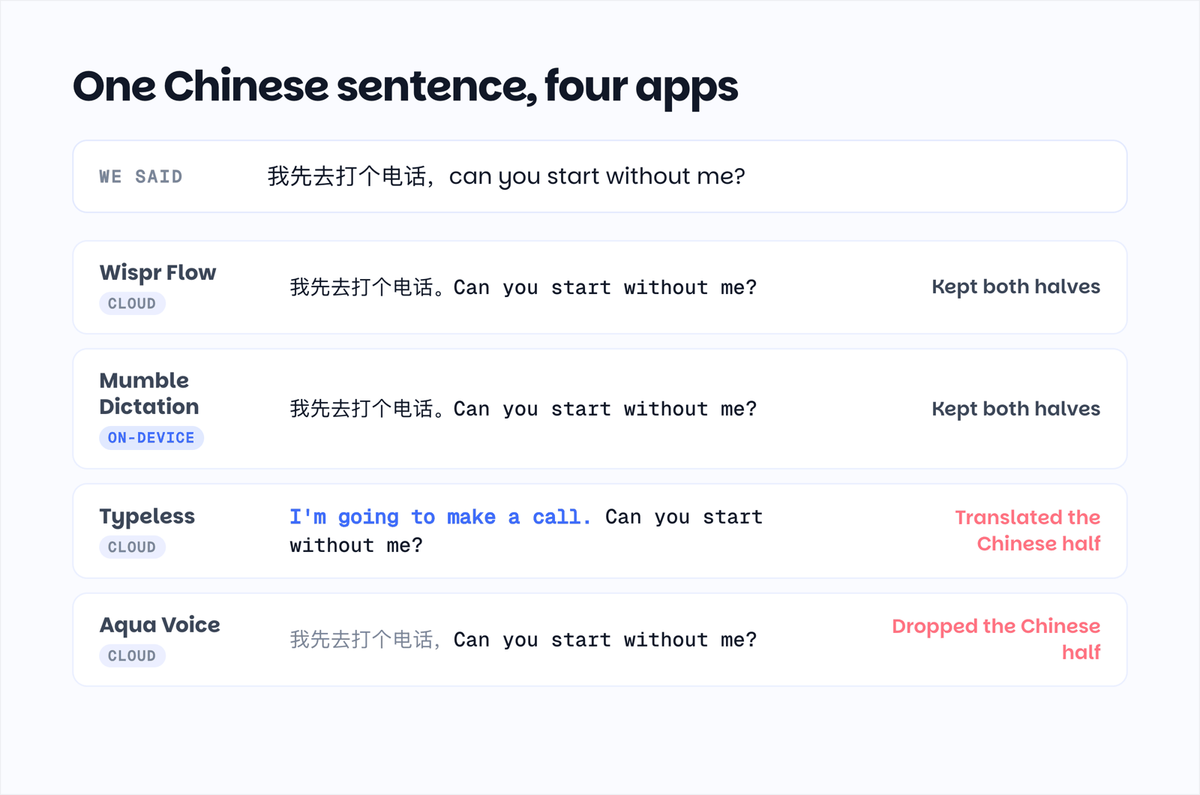
Before the app-by-app results, the two output patterns that explain almost every failure we saw. A caveat first: from the outside we can only see what each app inserts, not what happens inside its pipeline, so these are descriptions of output behavior, not diagnoses.
Translation instead of transcription. Six of the nine apps returned at least one clip where part of what we said came back in the other language. Willow turned "and I'll bring the slides for the Q4 review" into "und ich bringe die Slides für die Q4-Bilanz". Typeless turned "我先去打个电话" into "I'm going to make a call". Superwhisper, on the Whisper Large v3 Turbo model, turned "can you start without me?" into "可以先不等我开始吗". The words are right. The language is not what you said. This can happen at more than one stage: Whisper-family speech models are known to drift into translating rather than transcribing, and the AI cleanup step many apps run afterward can also rewrite a sentence into one language. We cannot see which stage is responsible in someone else's app; we only know the text that landed.
Dropping half the sentence. Some apps commit to one language for the whole clip and discard what does not fit. Aqua Voice kept only the English half of every clause-level sentence: "Can you handle the client call?" with the French half gone, "The total looks different from last week" with the Japanese half gone. This is the behavior Wispr Flow's documentation warns about for its own app, and it is the reason "auto-detect" alone does not tell you whether an app clears level 3.
If your dictation app sometimes rewrites what you said in another language, this is the pattern you are seeing, and it is why we scored raw output instead of trusting language-count claims.
The cloud apps
These apps send your audio to their servers. In exchange they typically run larger models than fit on a laptop, and in our test they handled mixed-language sentences best.
Monologue: both levels, all six pairs
Best for: people who want the strongest mixed-language results plus voice notes and meeting transcription in one app.
Monologue's website says "Go ahead and switch to Spanish mid-sentence. Monologue keeps up." We tried it with six languages and it kept up in all of them, including the Japanese clause sentence that tripped up most apps. Its Chinese and Japanese output was clean, and Hindi came out in Devanagari with English terms mostly preserved.
Where it falls short: small slips rather than failures. "And copy Sarah" came back as "y copia Sarah", the word "deck" was written as डेक inside the Hindi sentence, and one Japanese word gained an extra character. Those results are for the Remote mode it recommends, which is cloud only. We also ran the clips through its Local model: Spanish, German, and French were fine, Chinese, Japanese, and Hindi came back unreadable, and the German and Chinese clause-level sentences lost their first half, the same pattern as every other 25-language on-device model in this test. Free for 1,000 dictation words, then $15 a month, or $144 a year.
Wispr Flow: both levels, never translates
Best for: anyone who wants exactly what they said, in the script they said it, and is fine with cloud processing.
Wispr Flow handled every Spanish, Hindi, German, and French switch at both the word and clause level. It kept English terms in Latin letters inside Hindi sentences ("कल meeting 10:00 बजे है"), which is how many Hinglish speakers prefer to write. It was the one app in the test that never rendered any part of a sentence in a language we did not speak.
This is more than its own help center promises. The documentation says detection happens per session and recommends turning auto-detect off if you code-switch often. In practice, with auto-detect on, it followed the switch mid-sentence in five of six language pairs.
Where it falls short: the Japanese clause-level sentence came out romanized ("Mitsumori shou kakunin shimashita ga"), and one Chinese sentence had a single wrong character. Everything is processed in the cloud, on every plan. Free for 2,000 words a week on desktop; Pro is $15 a month, or $12 a month billed yearly. See how it compares on price in our Wispr Flow pricing breakdown.
Typeless: both levels, biggest free tier
Best for: the largest free allowance in the category, and among the best Japanese results in our test.
Typeless matched Wispr Flow on the European pairs and got "見積書を確認しましたが、the total looks different from last week" exactly right. Its free plan gives you 8,000 words a week, four times Wispr Flow's, which we covered in detail in Typeless vs Wispr Flow.
Where it falls short: it translated the Chinese half of one clause-level sentence into English, which our scoring counts as a failure for that clip. It also wrote the English half of one Hindi sentence phonetically in Devanagari ("सो कीप द नंबर्स रेडी"), a style choice we log in the Hinglish column rather than as an error. Auto-detect is off by default; you have to enable it in Settings. Cloud only. $12 a month billed yearly, $30 a month billed monthly.
VoiceOS: both levels, no Hindi
Best for: Chinese and Japanese speakers, if your other language is on its list.
VoiceOS handled every European pair and both Japanese sentences, including the clause-level one. It is one of three apps that did.
Where it falls short: its language list has no Hindi, so it translated our Hinglish sentence into Chinese, the nearest language we had enabled, and dropped the Hindi half of the other. You also have to tick each language you use; "auto-detect" only chooses among the ones you ticked. Free for 100 dictations a week, then $12 a month billed yearly.
Willow Voice: partial at both levels
Best for: people who want a polished cloud app and mostly dictate in one language at a time.
Willow Voice lists 100+ languages. In our test it handled French cleanly, Chinese with one wrong character, and produced romanized Hindi ("kal meeting 10:00 baje hai"), which some Hinglish speakers prefer and which we score as a style, not an error.
Where it falls short: it translated the English half of two sentences into Spanish and German, dropped the first half of a German sentence, and turned the Japanese half of a sentence into Korean characters. Those four count as failures under our scoring. Free tier uses a weaker model; Pro is $15 a month, or $12 a month billed yearly.
Aqua Voice: word level only
Best for: fast English dictation with occasional Spanish.
Aqua Voice's Avalon 1.5 model is described as multilingual, and it handled Spanish, German, French, and Japanese word-level sentences well.
Where it falls short: on the German, French, Chinese, and Japanese clause-level sentences it kept only the English half. The Chinese word-level sentence and the Hindi clause-level sentence produced no text at all, twice. Free for 1,000 words, then $8 a month.
The on-device apps
These apps process your voice on the Mac. Nothing is uploaded, which is the reason to choose them, and it also means they run smaller models than the cloud apps. For a longer look at what "on-device" really covers, see our guide to private dictation on Mac.
Mumble Dictation: every pair at word level, on-device
Best for: bilingual professionals who want their audio and text to stay on the Mac, and who mostly mix English terms into their own language.
Mumble Dictation runs both the voice model and the language model on-device and detects the language automatically. In our test it handled the word-level sentence in all six language pairs: English product terms inside Chinese ("这个 feature 我们下周 ship,但是 onboarding 的文案还要再写一版"), English business terms inside German ("das Due Date und die Purchase Order"), and the same for Spanish, Hindi, French, and Japanese. It also handled the clause-level switch in Spanish, French, and Chinese. That covers the way most bilingual people dictate at work: one language as the frame, a handful of English words inside it.
What we are still working on: clause-level switching in German and Hindi, where our on-device language model sometimes rewrites the second half in the first half's language, and the Japanese clause-level sentence, which came out romanized. Because this is our own app, we can see the pipeline: the voice model transcribes these correctly, and the on-device cleanup step is the part we are tuning. Full on-device AI needs an Apple Silicon Mac with 16GB of memory. Free with unlimited dictation and no account; Pro is $100 once for three Macs, currently $50.
Superwhisper: depends on the model you pick
Best for: people who like choosing their own model and are willing to wait for downloads.
Superwhisper's results are entirely a function of the model you pick. With the Parakeet multilingual model it recommends first, Spanish, German, and French were handled perfectly and Chinese, Japanese, and Hindi were unreadable, because that model covers 25 European languages. With Whisper Large v3 Turbo, all six languages became readable and every word-level pair passed, but halves of clause-level sentences started coming back translated or dropped, the same output pattern we saw from several cloud apps.
Where it falls short: the model choice is on you, and the documentation does not say which model handles which languages. The free tier includes unlimited use of Whisper models; Pro is $8.49 a month, $84.99 a year, or $249.99 once.
Voibe: one language at a time
Best for: single-language dictation on an Apple Silicon Mac.
Voibe can run fully on-device, but it asks you to pick one primary language, and there is no auto-detect. With English as the primary language, every non-English half of our sentences came back as unrelated English. That is what a single-language setup does with speech it was not built for, and it means Voibe is not a multilingual dictation app in any of the three senses above. $7.50 a month, $59 a year, or $149 once; no free tier, 7-day trial.
Apple Dictation: manual switching only
Best for: free, built in, and fine if you switch languages between sentences rather than inside them.
Apple Dictation supports 54 languages and regions, and 29 of them can run on-device on Apple Silicon Macs, according to Apple's macOS feature availability page. Two things are worth separating here. What Apple's documentation says: you can set up Dictation in multiple languages and switch between them while dictating by clicking the language chip in the feedback window or pressing the Globe key. What our hand test found: within one session, a sentence that mixes two languages only survives in the currently selected language; the other half was dropped or misrecognized. We tested it by hand rather than through our clips, because macOS mutes system audio while Dictation is listening.
Which apps we included and why
We included apps that offer system-wide dictation on the Mac, claim multilingual support or automatic language detection on their official site, and that we could install and run during the test week. A few smaller tools also market mixed-language dictation, and some launched while we were testing; we would rather publish a deep test of ten than a shallow list of twenty, and we will add new apps to the results page when we re-run the benchmark. If there is an app you want added, tell us at feedback@heymumble.com.
Offline and non-English: the part nobody explains
Two facts change how you should read the on-device table.
First, on-device does not mean every language is on-device. Apple lists 54 dictation languages but only 29 with on-device processing; the rest are processed on Apple's servers even when you think you are dictating locally. Apps built on Whisper-family models run all their languages locally, which is why a small third-party app can cover Hindi offline when the built-in dictation cannot.
Second, "multilingual model" has a hidden footnote. NVIDIA's Parakeet models, which several on-device apps offer because they are fast, cover 25 European languages. If your second language is Chinese, Japanese, Hindi, Korean, or Arabic, a Parakeet-only app will not work for you no matter what the language count on the box says. Mumble Dictation's on-device models cover 40 languages including all six we tested; Superwhisper depends on which model you download, and Monologue's Local model is a 25-language one, which is why its on-device row looks nothing like its cloud row.
If privacy is the reason you are choosing on-device, check both: which languages actually stay local, and whether the model behind them is a European-only one.
What it costs to dictate in two languages
Every app on this list charges the same whether you dictate in one language or five, so the real cost question is subscription versus one-time purchase. The one-time options are Mumble Dictation Pro at $100 (currently $50 early bird), Voibe at $149, and Superwhisper's lifetime license at $249.99. The subscription apps (Wispr Flow, Typeless, Monologue, VoiceOS, Willow Voice) cluster at $144 a year on annual billing, or about $432 over three years, with Aqua Voice cheaper at $96 a year. Prices checked on September 3, 2026 on each product's official pricing page; links in Sources below, and the long-term math for the biggest name in the category is in our Wispr Flow pricing breakdown.
FAQ
Which Mac dictation app can switch between Spanish and English mid-sentence?
Monologue, Wispr Flow, and Typeless all handled a sentence that starts in English and finishes in Spanish, and the reverse, in our test. If your audio has to stay on your Mac, Mumble Dictation handled both the Spanish sentence with English terms and the sentence that switched halfway.
What is the best dictation app for Chinese and English mixed sentences on Mac?
In our test, Mumble Dictation, Wispr Flow, Monologue, and Typeless all handled English product terms inside a Chinese sentence, such as "这个 feature 我们下周 ship". For sentences that switch halfway between Chinese and English, Mumble Dictation, Wispr Flow, Monologue, Willow, and VoiceOS kept both halves; Typeless translated the Chinese half into English. Mumble Dictation is the one that processes both halves on your Mac.
Which dictation app handles Japanese and English in the same sentence?
Only Monologue, Typeless, and VoiceOS transcribed our Japanese sentence with an English clause correctly. Wispr Flow, Mumble Dictation, and Superwhisper returned the Japanese half in romaji rather than Japanese script. If Japanese-English mixing is your main use, those three cloud apps are currently ahead.
What is the best dictation app for Hinglish on Mac?
It depends on how you want Hinglish written, because the apps disagree. Wispr Flow keeps English words in Latin letters inside Devanagari sentences ("कल meeting 10:00 बजे है"). Mumble Dictation and Typeless write English words in Devanagari. Willow Voice and Aqua Voice romanize the whole sentence. All of these are readable; pick the app whose style matches how you and your contacts actually type Hinglish.
Does Apple Dictation support two languages at once?
Apple's documentation describes setting up multiple languages and switching between them manually with the language chip or the Globe key while you dictate. In our hand test, a single sentence that mixes two languages was only transcribed in the selected language, with the other half dropped or misrecognized. So it works for switching between sentences, not inside them.
Do offline dictation apps handle Spanish, Chinese, or German as well as cloud apps?
For single-language sentences and for English words inside another language, yes. In our test the on-device app Mumble Dictation handled all six language pairs at that level. Cloud apps still did better on sentences that change language halfway through.
Sources
All facts below were checked on the linked official pages on September 3, 2026.
- Wispr Flow pricing: https://wisprflow.ai/pricing
- Wispr Flow, Use Flow with multiple languages: https://docs.wisprflow.ai/articles/3191899797-use-flow-with-multiple-languages
- Monologue pricing: https://www.monologue.to/pricing
- Typeless pricing: https://www.typeless.com/pricing
- VoiceOS pricing: https://www.voiceos.com/pricing
- Willow Voice pricing: https://willowvoice.com/pricing
- Aqua Voice pricing: https://aquavoice.com/
- Superwhisper Pro pricing: https://superwhisper.com/docs/get-started/sw-pro
- Voibe pricing: https://www.getvoibe.com/
- Mumble Dictation pricing: https://heymumble.com/dictation/pricing
- Apple, Use Dictation on Mac: https://support.apple.com/guide/mac-help/mh40584/mac
- Apple, macOS feature availability: https://www.apple.com/macos/feature-availability/
- U.S. Census Bureau, Language Spoken at Home, ACS 2018 to 2022: https://www.census.gov/newsroom/press-releases/2023/language-at-home-acs-5-year.html
- Raw test results with audio, 13 clips across 9 apps: https://heymumble.com/tests/multilingual-dictation-2026-09